Staged Update
While users can rely on the RollingUpdate rollout strategy in the placement to safely roll out their workloads,
many organizations require more sophisticated deployment control mechanisms for their fleet operations.
Standard rolling updates, while effective for individual rollout, lack the granular control and coordination capabilities needed for complex, multi-cluster environments.
Why Staged Rollouts?
Staged rollouts address critical deployment challenges that organizations face when managing workloads across distributed environments:
Strategic Grouping and Ordering
Traditional rollout strategies treat all target clusters uniformly, but real-world deployments often require strategic sequencing. Staged rollouts enable you to:
- Group clusters by environment (development → staging → production)
- Prioritize by criticality (test clusters before business-critical systems)
- Sequence by dependencies (deploy foundational services before dependent applications)
This grouping capability ensures that updates follow your organization’s risk management and operational requirements rather than arbitrary ordering.
Enhanced Control and Approval Gates
Automated rollouts provide speed but can propagate issues rapidly across your entire fleet. Staged rollouts introduce deliberate checkpoints that give teams control over the rollout progression:
- Manual approval gates between stages allow human validation of rollout health
- Automated wait periods provide time for monitoring and observation
Dual-Scope Architecture
Kubefleet provides staged update capabilities at two different scopes to address different organizational roles and operational requirements:
- Cluster-scoped staged updates for fleet administrators who need to manage rollouts across entire clusters
- Namespace-scoped staged updates for application teams who need to manage rollouts within their specific namespaces
This dual approach enables fleet administrators to maintain oversight of infrastructure-level changes while empowering application teams with autonomous control over their specific workloads.
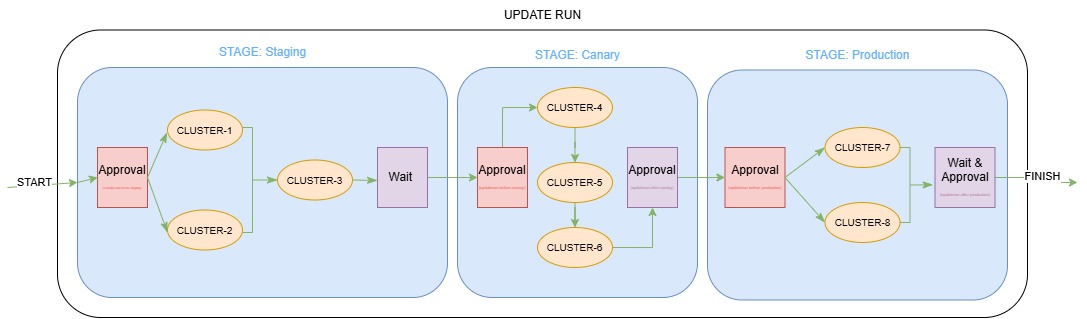
Diagram Example Configuration
apiVersion: placement.kubernetes-fleet.io/v1beta1
kind: ClusterStagedUpdateStrategy
metadata:
  name: production-rollout
spec:
  stages:
    - name: staging
      labelSelector:
        matchLabels:
          environment: staging
      maxConcurrency: 75%
      beforeStageTasks:
        - type: Approval
      afterStageTasks:
        - type: TimedWait
          waitTime: 1h
    - name: canary
      labelSelector:
        matchLabels:
          environment: canary
      # Default MaxConcurrency (1)
      beforeStageTasks:
        - type: Approval
      afterStageTasks:
        - type: Approval
    - name: production
      labelSelector:
        matchLabels:
          environment: production
      maxConcurrency: 2
      beforeStageTasks:
        - type: Approval
      afterStageTasks:
        - type: TimedWait
          waitTime: 1h
        - type: Approval
Overview
Kubefleet provides staged update capabilities at two scopes to serve different organizational needs:
Cluster-Scoped: ClusterStagedUpdateStrategy, ClusterStagedUpdateRun, and ClusterApprovalRequest for fleet administrators managing infrastructure-level changes across clusters.
Namespace-Scoped: StagedUpdateStrategy, StagedUpdateRun, and ApprovalRequest for application teams managing rollouts within their specific namespaces.
Both systems follow the same pattern:
- Strategy resources define reusable orchestration patterns with stages, ordering, and approval gates
- UpdateRun resources execute the strategy for specific rollouts using a target placement, resource snapshot, and strategy name
- External rollout strategy must be set on the target placement to enable staged updates
Key Differences by Persona
| Aspect | Fleet Administrators (Cluster-Scoped) | Application Teams (Namespace-Scoped) |
|---|---|---|
| Scope | Entire clusters and infrastructure | Individual applications within namespaces |
| Resources | ClusterStagedUpdateStrategy, ClusterStagedUpdateRun, ClusterApprovalRequest | StagedUpdateStrategy, StagedUpdateRun, ApprovalRequest |
| Target | ClusterResourcePlacement | ResourcePlacement (namespace-scoped) |
| Use Cases | Fleet-wide updates, infrastructure changes | Application rollouts, service updates |
| Permission | Requires cluster-admin permissions | Operates within namespace boundaries |
Configure External Rollout Strategy
Both placement types require setting the rollout strategy to External to enable staged updates:
Cluster-scoped example:
apiVersion: placement.kubernetes-fleet.io/v1beta1
kind: ClusterResourcePlacement
metadata:
  name: example-placement
spec:
  resourceSelectors:
    - group: ""
      kind: Namespace
      name: test-namespace
      version: v1
  policy:
    placementType: PickAll
  strategy:
    type: External # enables staged updates
Namespace-scoped example:
apiVersion: placement.kubernetes-fleet.io/v1beta1
kind: ResourcePlacement
metadata:
  name: example-namespace-placement
  namespace: my-app-namespace
spec:
  resourceSelectors:
    - group: "apps"
      kind: Deployment
      name: my-application
      version: v1
  policy:
    placementType: PickAll
  strategy:
    type: External # enables staged updates
Define Staged Update Strategies
Staged update strategies define reusable orchestration patterns that organize target clusters into stages with specific rollout sequences and approval gates. Both scopes use similar configurations but operate at different levels.
Cluster-Scoped Strategy
ClusterStagedUpdateStrategy organizes member clusters into stages:
apiVersion: placement.kubernetes-fleet.io/v1beta1
kind: ClusterStagedUpdateStrategy
metadata:
  name: cluster-config-strategy
spec:
  stages:
    - name: staging
      labelSelector:
        matchLabels:
          environment: staging
      maxConcurrency: 2  # Update 2 clusters concurrently
      afterStageTasks:
        - type: TimedWait
          waitTime: 1h
    - name: canary
      labelSelector:
        matchLabels:
          environment: canary
      maxConcurrency: 1  # Sequential updates (default)
      beforeStageTasks:
        - type: Approval  # Require approval before starting canary stage
      afterStageTasks:
        - type: Approval
    - name: production
      labelSelector:
        matchLabels:
          environment: production
      sortingLabelKey: order
      maxConcurrency: 50%  # Update 50% of production clusters at once
      afterStageTasks:
        - type: Approval
        - type: TimedWait
          waitTime: 1h
Namespace-Scoped Strategy
StagedUpdateStrategy follows the same pattern but operates within namespace boundaries:
apiVersion: placement.kubernetes-fleet.io/v1beta1
kind: StagedUpdateStrategy
metadata:
  name: app-rollout-strategy
  namespace: my-app-namespace
spec:
  stages:
    - name: dev
      labelSelector:
        matchLabels:
          environment: development
      maxConcurrency: 3  # Update 3 dev clusters at once
      afterStageTasks:
        - type: TimedWait
          waitTime: 30m
    - name: prod
      labelSelector:
        matchLabels:
          environment: production
      sortingLabelKey: deployment-order
      maxConcurrency: 1  # Sequential production updates
      afterStageTasks:
        - type: Approval
Stage Configuration
Each stage includes:
- name: Unique identifier for the stage
- labelSelector: Selects target clusters for this stage
- sortingLabelKey (optional): Label whose integer value determines update sequence within the stage
- maxConcurrency (optional): Maximum number of clusters to update concurrently within the stage. Can be an absolute number (e.g.,
5) or percentage (e.g.,50%). Defaults to1(sequential). Fractional results are rounded down with a minimum of 1 - beforeStageTasks (optional): Tasks that must complete before starting the stage (max 1 task, Approval type only)
- afterStageTasks (optional): Tasks that must complete before proceeding to the next stage (max 2 tasks, Approval and/or TimedWait type)
Stage Tasks
Stage tasks provide control gates at different points in the rollout lifecycle:
Before-Stage Tasks
Execute before a stage begins. Only one task allowed per stage. Supported types:
- Approval: Requires manual approval before starting the stage
For before-stage approval tasks, the system creates an approval request named <updateRun-name>-before-<stage-name>.
After-Stage Tasks
Execute after all clusters in a stage complete. Up to two tasks allowed (one of each type). Supported types:
- TimedWait: Waits for a specified duration before proceeding to the next stage
- Approval: Requires manual approval before proceeding to the next stage
For after-stage approval tasks, the system creates an approval request named <updateRun-name>-after-<stage-name>.
Approval Request Details
For all approval tasks, the approval request type depends on the scope:
- Cluster-scoped: Creates
ClusterApprovalRequest(short name:careq) - a cluster-scoped resource containing a spec withparentStageRollout(the UpdateRun name) andtargetStage(the stage name). The spec is immutable after creation. - Namespace-scoped: Creates
ApprovalRequest(short name:areq) within the same namespace - a namespace-scoped resource with the same spec structure asClusterApprovalRequest.
Both approval request types use status conditions to track approval state:
Approvedcondition (statusTrue): indicates the request was approved by a userApprovalAcceptedcondition (statusTrue): indicates the approval was processed and accepted by the system
Approve manually by setting the Approved condition to True using kubectl patch:
Note: Observed generation in the Approved condition should match the generation of the approvalRequest object.
# For cluster-scoped before-stage approvals
kubectl patch clusterapprovalrequests example-run-before-canary --type='merge' \
  -p '{"status":{"conditions":[{"type":"Approved","status":"True","reason":"approved","message":"approved","lastTransitionTime":"'$(date -u +"%Y-%m-%dT%H:%M:%SZ")'","observedGeneration":1}]}}' \
  --subresource=status

# For cluster-scoped after-stage approvals
kubectl patch clusterapprovalrequests example-run-after-canary --type='merge' \
  -p '{"status":{"conditions":[{"type":"Approved","status":"True","reason":"approved","message":"approved","lastTransitionTime":"'$(date -u +"%Y-%m-%dT%H:%M:%SZ")'","observedGeneration":1}]}}' \
  --subresource=status

# For namespace-scoped approvals
kubectl patch approvalrequests example-run-before-canary -n test-namespace --type='merge' \
  -p '{"status":{"conditions":[{"type":"Approved","status":"True","reason":"approved","message":"approved","lastTransitionTime":"'$(date -u +"%Y-%m-%dT%H:%M:%SZ")'","observedGeneration":1}]}}' \
  --subresource=status
Trigger Staged Rollouts
UpdateRun resources execute strategies for specific rollouts. Both scopes follow the same pattern:
Cluster-scoped example:
apiVersion: placement.kubernetes-fleet.io/v1beta1
kind: ClusterStagedUpdateRun
metadata:
  name: example-run
spec:
  placementName: example-placement              # Required: Name of Target ClusterResourcePlacement
  resourceSnapshotIndex: "0"                    # Optional: Resource version (omit to use the latest snapshot, creating one if it does not already exist)
  stagedRolloutStrategyName: example-strategy   # Required: Name of the strategy to execute
  state: Run                                    # Optional: Initialize (default), Run, or Stop
Namespace-scoped example:
apiVersion: placement.kubernetes-fleet.io/v1beta1
kind: StagedUpdateRun
metadata:
  name: app-rollout-v1-2-3
  namespace: my-app-namespace
spec:
  placementName: example-namespace-placement      # Required: Name of target ResourcePlacement. The StagedUpdateRun must be created in the same namespace as the ResourcePlacement
  resourceSnapshotIndex: "5"                      # Optional: Resource version (omit to use the latest snapshot, creating one if it does not already exist)
  stagedRolloutStrategyName: app-rollout-strategy # Required: Name of the strategy to execute. Must be in the same namespace
  state: Initialize                               # Optional: Initialize (default), Run, or Stop
Creating Latest Resource Snapshot:
apiVersion: placement.kubernetes-fleet.io/v1beta1
kind: ClusterStagedUpdateRun
metadata:
  name: example-run-latest
spec:
  placementName: example-placement
  # resourceSnapshotIndex omitted - system uses the latest snapshot (creates one if it does not already exist)
  stagedRolloutStrategyName: example-strategy
  state: Run
UpdateRun State Management
UpdateRuns support three states to control execution lifecycle:
| State | Behavior | Use Case |
|---|---|---|
| Initialize | Prepares the updateRun without executing (default) | Review computed stages before starting rollout |
| Run | Executes the rollout or resumes from stopped state | Start or resume the staged rollout |
| Stop | Pauses execution at current cluster/stage | Temporarily halt rollout for investigation |
Valid State Transitions:
Initialize→Run: Start the rolloutRun→Stop: Pause the rolloutStop→Run: Resume the rollout
Invalid State Transitions:
Initialize→Stop: Cannot stop before startingRun→Initialize: Cannot reinitialize after startingStop→Initialize: Cannot reinitialize after stopping
The state field is the only mutable field in the UpdateRunSpec. You can update it to control rollout execution:
# Start a rollout
kubectl patch csur example-run --type='merge' -p '{"spec":{"state":"Run"}}'

# Pause a rollout
kubectl patch csur example-run --type='merge' -p '{"spec":{"state":"Stop"}}'

# Resume a paused rollout
kubectl patch csur example-run --type='merge' -p '{"spec":{"state":"Run"}}'
UpdateRun Execution
UpdateRuns execute in three phases:
- Initialization: Validates placement, captures latest strategy snapshot, collects target bindings, generates cluster update sequence, uses the specified resource snapshot or the latest snapshot (creating one if it does not already exist) if unspecified & records override snapshots. Occurs once on creation when state is
Initialize,RunorStop. - Execution: Processes stages sequentially, updates clusters within each stage (respecting maxConcurrency), enforces before-stage and after-stage tasks. Only occurs when state is
Run - Stopping/Stopped When state is
Stop, the updateRun pauses execution at the current cluster/stage and can be resumed by changing state back toRun. If there are updating/deleting clusters we wait after marking updateRun asStoppingfor the in-progress clusters to reach a deterministic state: succeeded, failed or stuck before marking updateRun asStopped
Important Constraints and Validation
Immutable Fields: Once created, the following UpdateRun spec fields cannot be modified:
placementName: Target placement resource nameresourceSnapshotIndex: Resource version to deploy (empty string if omitted)stagedRolloutStrategyName: Strategy to execute
Mutable Field: The state field can be modified after creation to control execution (Initialize, Run, Stop).
Strategy Limits: Each strategy can define a maximum of 31 stages to ensure reasonable execution times.
MaxConcurrency Validation:
- Must be >= 1 for absolute numbers
- Must be 1-100% for percentages
- Fractional results are rounded down with minimum of 1
Monitor UpdateRun Status
UpdateRun status provides detailed information about rollout progress across stages and clusters. The status includes:
- Overall conditions: Initialization, progression, and completion status
- Stage status: Progress and timing for each stage
- Cluster status: Individual cluster update results with maxConcurrency respected
- Before-stage task status: Pre-stage approval progress
- After-stage task status: Post-stage approval and wait task progress
- Resource snapshot used: The actual resource snapshot index used (from spec or latest)
- Policy snapshot used: The policy snapshot index used during initialization
Use kubectl describe to view detailed status:
# Cluster-scoped (can use short name 'csur')
kubectl describe clusterstagedupdaterun example-run
kubectl describe csur example-run

# Namespace-scoped (can use short name 'sur')
kubectl describe stagedupdaterun app-rollout-v1-2-3 -n my-app-namespace
kubectl describe sur app-rollout-v1-2-3 -n my-app-namespace
UpdateRun and Placement Relationship
UpdateRuns and Placements work together to orchestrate rollouts, with each serving a distinct purpose:
The Trigger Mechanism
UpdateRuns serve as the trigger that initiates rollouts for their respective placement resources:
- Cluster-scoped:
ClusterStagedUpdateRuntriggersClusterResourcePlacement - Namespace-scoped:
StagedUpdateRuntriggersResourcePlacement
Before an UpdateRun is Created
When you create a Placement with spec.strategy.type: External, the system schedules which clusters should receive the resources, but does not deploy anything yet. The Placement remains in a scheduled but not available state, waiting for an UpdateRun to trigger the actual rollout.
Note: Resource snapshots are not automatically created for placements with
spec.strategy.type: External. If you create a new placement directly withExternalstrategy, you must omit theresourceSnapshotIndexfield in your UpdateRun spec to have the system create a new snapshot during initialization.
After an UpdateRun is Created
Once you create an UpdateRun, the system begins executing the staged rollout. Both resources provide status information, but at different levels of detail:
UpdateRun Status - High-level rollout orchestration:
- Which stage is currently executing
- Which clusters have started/completed updates
- Whether after-stage tasks (approvals, waits) are complete
- Overall rollout progression through stages
Placement Status - Detailed deployment information for each cluster:
- Success or failure of individual resource creation (e.g., did the Deployment create successfully?)
- Whether overrides were applied correctly
- Specific error messages if resources failed to deploy
- Detailed conditions for troubleshooting
This separation of concerns allows you to:
- Monitor high-level rollout progress and stage execution through the UpdateRun
- Drill down into specific deployment issues on individual clusters through the Placement
- Understand whether a problem is with the staged rollout orchestration or with resource deployment itself
Concurrent UpdateRuns
Multiple UpdateRuns can execute concurrently for the same placement with one constraint: all concurrent runs must use identical strategy configurations to ensure consistent behavior.
Next Steps
- Learn how to rollout and rollback CRP resources with Staged Update Run
- Learn how to troubleshoot a Staged Update Run
Feedback
Was this page helpful?
Glad to hear it! Please tell us how we can further improve.
Sorry to hear that. Please tell us how we can fix the experience for you.