The documentation in this section explains core Fleet concepts. Pick one below to proceed.
This is the multi-page printable view of this section. Click here to print.
Concepts
Core concepts in Fleet
- 1: Fleet components
- 2: MemberCluster
- 3: ClusterResourcePlacement
- 4: ResourcePlacement
- 5: Scheduler
- 6: Scheduling Framework
- 7: Properties and Property Providers
- 8: Safe Rollout
- 9: Override
- 10: Staged Update
- 11: Eviction and Placement Disruption Budget
1 - Fleet components
Concept about the Fleet components
Components
This document provides an overview of the components required for a fully functional and operational Fleet setup.
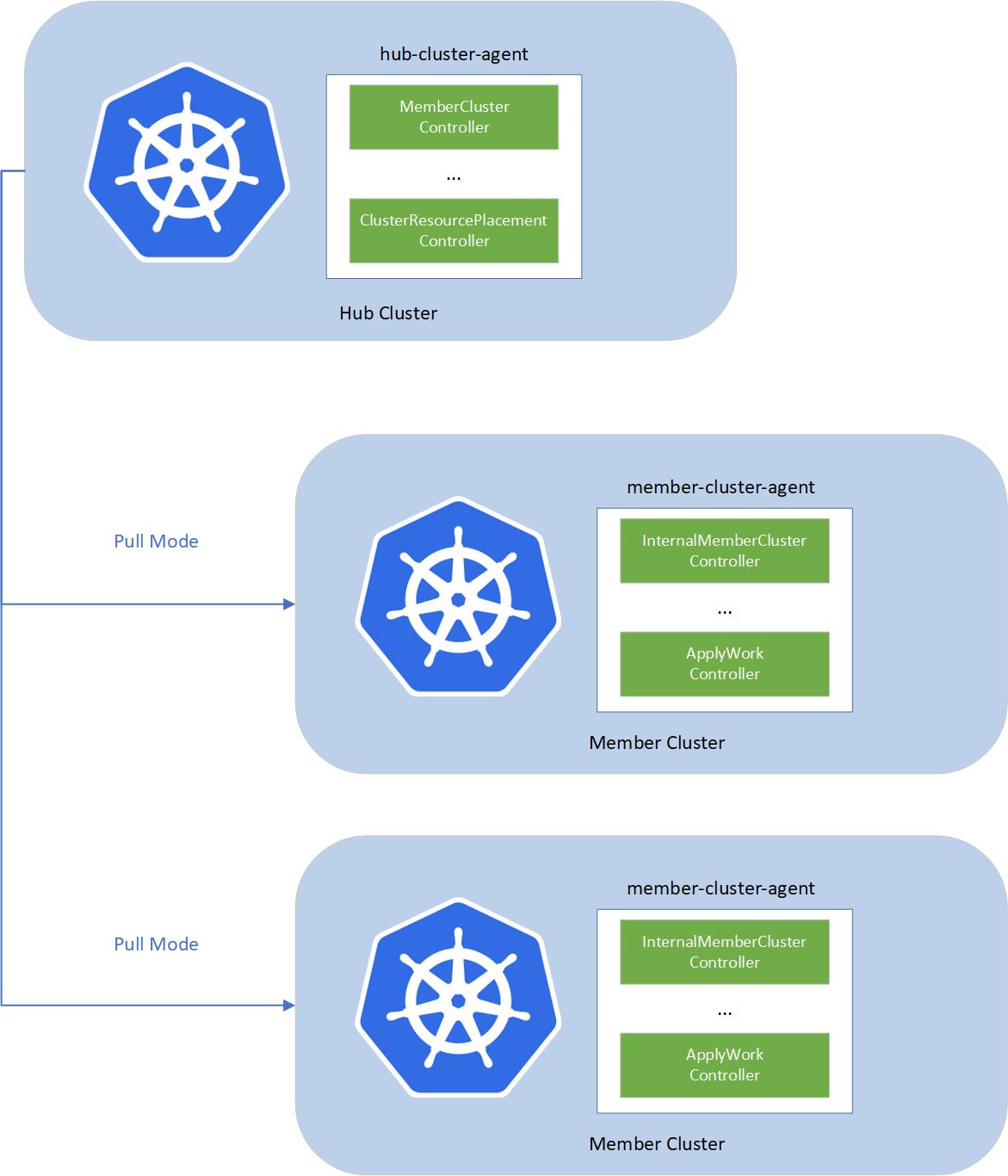
The fleet consists of the following components:
- fleet-hub-agent is a Kubernetes controller that creates and reconciles all the fleet related CRs in the hub cluster.
- fleet-member-agent is a Kubernetes controller that creates and reconciles all the fleet related CRs in the member cluster. The fleet-member-agent is pulling the latest CRs from the hub cluster and consistently reconciles the member clusters to the desired state.
The fleet implements agent-based pull mode. So that the working pressure can be distributed to the member clusters, and it helps to breach the bottleneck of scalability, by dividing the load into each member cluster. On the other hand, hub cluster does not need to directly access to the member clusters. Fleet can support the member clusters which only have the outbound network and no inbound network access.
To allow multiple clusters to run securely, fleet will create a reserved namespace on the hub cluster to isolate the access permissions and resources across multiple clusters.
2 - MemberCluster
Concept about the MemberCluster API
Overview
The fleet constitutes an implementation of a ClusterSet and
encompasses the following attributes:
- A collective of clusters managed by a centralized authority.
- Typically characterized by a high level of mutual trust within the cluster set.
- Embraces the principle of Namespace Sameness across clusters:
- Ensures uniform permissions and characteristics for a given namespace across all clusters.
- While not mandatory for every cluster, namespaces exhibit consistent behavior across those where they are present.
The MemberCluster represents a cluster-scoped API established within the hub cluster, serving as a representation of
a cluster within the fleet. This API offers a dependable, uniform, and automated approach for multi-cluster applications
(frameworks, toolsets) to identify registered clusters within a fleet. Additionally, it facilitates applications in querying
a list of clusters managed by the fleet or observing cluster statuses for subsequent actions.
Some illustrative use cases encompass:
- The Fleet Scheduler utilizing managed cluster statuses or specific cluster properties (e.g., labels, taints) of a
MemberClusterfor resource scheduling. - Automation tools like GitOps systems (e.g., ArgoCD or Flux) automatically registering/deregistering clusters in compliance
with the
MemberClusterAPI. - The MCS API automatically generating
ServiceImportCRs based on theMemberClusterCR defined within a fleet.
Moreover, it furnishes a user-friendly interface for human operators to monitor the managed clusters.
MemberCluster Lifecycle
Joining the Fleet
The process to join the Fleet involves creating a MemberCluster. The MemberCluster controller, a constituent of the
hub-cluster-agent described in the Component, watches the MemberCluster CR and generates
a corresponding namespace for the member cluster within the hub cluster. It configures roles and role bindings within the
hub cluster, authorizing the specified member cluster identity (as detailed in the MemberCluster spec) access solely
to resources within that namespace. To collate member cluster status, the controller generates another internal CR named
InternalMemberCluster within the newly formed namespace. Simultaneously, the InternalMemberCluster controller, a component
of the member-cluster-agent situated in the member cluster, gathers statistics on cluster usage, such as capacity utilization,
and reports its status based on the HeartbeatPeriodSeconds specified in the CR. Meanwhile, the MemberCluster controller
consolidates agent statuses and marks the cluster as Joined.
Leaving the Fleet
Fleet administrators can deregister a cluster by deleting the MemberCluster CR. Upon detection of deletion events by
the MemberCluster controller within the hub cluster, it removes the corresponding InternalMemberCluster CR in the
reserved namespace of the member cluster. It awaits completion of the “leave” process by the InternalMemberCluster
controller of member agents, and then deletes role and role bindings and other resources including the member cluster reserved
namespaces on the hub cluster.
Taints
Taints are a mechanism to prevent the Fleet Scheduler from scheduling resources to a MemberCluster. We adopt the concept of
taints and tolerations introduced in Kubernetes to
the multi-cluster use case.
The MemberCluster CR supports the specification of list of taints, which are applied to the MemberCluster. Each Taint object comprises
the following fields:
key: The key of the taint.value: The value of the taint.effect: The effect of the taint, which can beNoSchedulefor now.
Once a MemberCluster is tainted with a specific taint, it lets the Fleet Scheduler know that the MemberCluster should not receive resources
as part of the workload propagation from the hub cluster.
The NoSchedule taint is a signal to the Fleet Scheduler to avoid scheduling resources from a ClusterResourcePlacement to the MemberCluster.
Any MemberCluster already selected for resource propagation will continue to receive resources even if a new taint is added.
Taints are only honored by ClusterResourcePlacement with PickAll, PickN placement policies. In the case of PickFixed placement policy
the taints are ignored because the user has explicitly specify the MemberClusters where the resources should be placed.
For detailed instructions, please refer to this document.
What’s next
- Get hands-on experience how to add a member cluster to a fleet.
- Explore the
ClusterResourcePlacementconcept to placement cluster scope resources among managed clusters.
3 - ClusterResourcePlacement
Concept about the ClusterResourcePlacement API
Overview
ClusterResourcePlacement concept is used to dynamically select cluster scoped resources (especially namespaces and all
objects within it) and control how they are propagated to all or a subset of the member clusters.
A ClusterResourcePlacement mainly consists of three parts:
Resource selection: select which cluster-scoped Kubernetes resource objects need to be propagated from the hub cluster to selected member clusters.
It supports the following forms of resource selection:
- Select resources by specifying just the <group, version, kind>. This selection propagates all resources with matching <group, version, kind>.
- Select resources by specifying the <group, version, kind> and name. This selection propagates only one resource that matches the <group, version, kind> and name.
- Select resources by specifying the <group, version, kind> and a set of labels using ClusterResourcePlacement -> LabelSelector. This selection propagates all resources that match the <group, version, kind> and label specified.
Note: When a namespace is selected, all the namespace-scoped objects under this namespace are propagated to the selected member clusters along with this namespace.
Placement policy: limit propagation of selected resources to a specific subset of member clusters. The following types of target cluster selection are supported:
- PickAll (Default): select any member clusters with matching cluster
Affinityscheduling rules. If theAffinityis not specified, it will select all joined and healthy member clusters. - PickFixed: select a fixed list of member clusters defined in the
ClusterNames. - PickN: select a
NumberOfClustersof member clusters with optional matching clusterAffinityscheduling rules or topology spread constraintsTopologySpreadConstraints.
- PickAll (Default): select any member clusters with matching cluster
Strategy: how changes are rolled out (rollout strategy) and how resources are applied on the member cluster side (apply strategy).
A simple ClusterResourcePlacement looks like this:
apiVersion: placement.kubernetes-fleet.io/v1
kind: ClusterResourcePlacement
metadata:
  name: crp-1
spec:
  policy:
    placementType: PickN
    numberOfClusters: 2
    topologySpreadConstraints:
      - maxSkew: 1
        topologyKey: "env"
        whenUnsatisfiable: DoNotSchedule
  resourceSelectors:
    - group: ""
      kind: Namespace
      name: test-deployment
      version: v1
  revisionHistoryLimit: 100
  strategy:
    rollingUpdate:
      maxSurge: 25%
      maxUnavailable: 25%
      unavailablePeriodSeconds: 5
    type: RollingUpdate
When To Use ClusterResourcePlacement
ClusterResourcePlacement is useful when you want for a general way of managing and running workloads across multiple clusters.
Some example scenarios include the following:
- As a platform operator, I want to place my cluster-scoped resources (especially namespaces and all objects within it) to a cluster that resides in the us-east-1.
- As a platform operator, I want to spread my cluster-scoped resources (especially namespaces and all objects within it) evenly across the different regions/zones.
- As a platform operator, I prefer to place my test resources into the staging AKS cluster.
- As a platform operator, I would like to separate the workloads for compliance or policy reasons.
- As a developer, I want to run my cluster-scoped resources (especially namespaces and all objects within it) on 3 clusters. In addition, each time I update my workloads, the updates take place with zero downtime by rolling out to these three clusters incrementally.
Placement Workflow
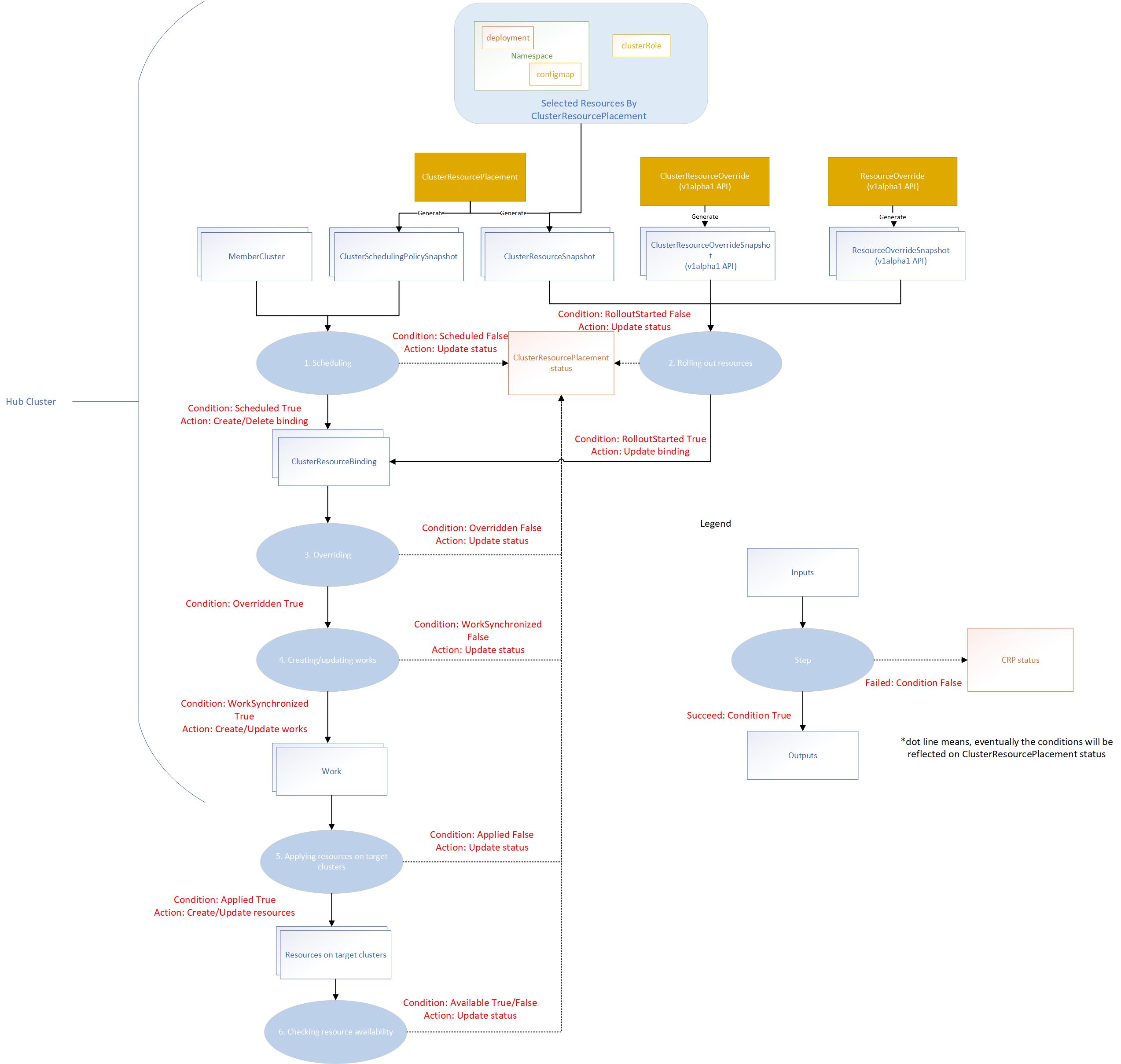
The placement controller will create ClusterSchedulingPolicySnapshot and ClusterResourceSnapshot snapshots by watching
the ClusterResourcePlacement object. So that it can trigger the scheduling and resource rollout process whenever needed.
The override controller will create the corresponding snapshots by watching the ClusterResourceOverride and ResourceOverride
which captures the snapshot of the overrides.
The placement workflow will be divided into several stages:
- Scheduling: multi-cluster scheduler makes the schedule decision by creating the
clusterResourceBindingfor a bundle of resources based on the latestClusterSchedulingPolicySnapshotgenerated by theClusterResourcePlacement. - Rolling out resources: rollout controller applies the resources to the selected member clusters based on the rollout strategy.
- Overriding: work generator applies the override rules defined by
ClusterResourceOverrideandResourceOverrideto the selected resources on the target clusters. - Creating or updating works: work generator creates the work on the corresponding member cluster namespace. Each work contains the (overridden) manifest workload to be deployed on the member clusters.
- Applying resources on target clusters: apply work controller applies the manifest workload on the member clusters.
- Checking resource availability: apply work controller checks the resource availability on the target clusters.
Resource Selection
Resource selectors identify cluster-scoped objects to include based on standard Kubernetes identifiers - namely, the group,
kind, version, and name of the object. Namespace-scoped objects are included automatically when the namespace they
are part of is selected. The example ClusterResourcePlacement above would include the test-deployment namespace and
any objects that were created in that namespace.
The clusterResourcePlacement controller creates the ClusterResourceSnapshot to store a snapshot of selected resources
selected by the placement. The ClusterResourceSnapshot spec is immutable. Each time when the selected resources are updated,
the clusterResourcePlacement controller will detect the resource changes and create a new ClusterResourceSnapshot. It implies
that resources can change independently of any modifications to the ClusterResourceSnapshot. In other words, resource
changes can occur without directly affecting the ClusterResourceSnapshot itself.
The total amount of selected resources may exceed the 1MB limit for a single Kubernetes object. As a result, the controller
may produce more than one ClusterResourceSnapshots for all the selected resources.
ClusterResourceSnapshot sample:
apiVersion: placement.kubernetes-fleet.io/v1
kind: ClusterResourceSnapshot
metadata:
  annotations:
    kubernetes-fleet.io/number-of-enveloped-object: "0"
    kubernetes-fleet.io/number-of-resource-snapshots: "1"
    kubernetes-fleet.io/resource-hash: e0927e7d75c7f52542a6d4299855995018f4a6de46edf0f814cfaa6e806543f3
  creationTimestamp: "2023-11-10T08:23:38Z"
  generation: 1
  labels:
    kubernetes-fleet.io/is-latest-snapshot: "true"
    kubernetes-fleet.io/parent-CRP: crp-1
    kubernetes-fleet.io/resource-index: "4"
  name: crp-1-4-snapshot
  ownerReferences:
  - apiVersion: placement.kubernetes-fleet.io/v1
    blockOwnerDeletion: true
    controller: true
    kind: ClusterResourcePlacement
    name: crp-1
    uid: 757f2d2c-682f-433f-b85c-265b74c3090b
  resourceVersion: "1641940"
  uid: d6e2108b-882b-4f6c-bb5e-c5ec5491dd20
spec:
  selectedResources:
  - apiVersion: v1
    kind: Namespace
    metadata:
      labels:
        kubernetes.io/metadata.name: test
      name: test
    spec:
      finalizers:
      - kubernetes
  - apiVersion: v1
    data:
      key1: value1
      key2: value2
      key3: value3
    kind: ConfigMap
    metadata:
      name: test-1
      namespace: test
Placement Policy
ClusterResourcePlacement supports three types of policy as mentioned above. ClusterSchedulingPolicySnapshot will be
generated whenever policy changes are made to the ClusterResourcePlacement that require a new scheduling. Similar to
ClusterResourceSnapshot, its spec is immutable.
ClusterSchedulingPolicySnapshot sample:
apiVersion: placement.kubernetes-fleet.io/v1
kind: ClusterSchedulingPolicySnapshot
metadata:
  annotations:
    kubernetes-fleet.io/CRP-generation: "5"
    kubernetes-fleet.io/number-of-clusters: "2"
  creationTimestamp: "2023-11-06T10:22:56Z"
  generation: 1
  labels:
    kubernetes-fleet.io/is-latest-snapshot: "true"
    kubernetes-fleet.io/parent-CRP: crp-1
    kubernetes-fleet.io/policy-index: "1"
  name: crp-1-1
  ownerReferences:
  - apiVersion: placement.kubernetes-fleet.io/v1
    blockOwnerDeletion: true
    controller: true
    kind: ClusterResourcePlacement
    name: crp-1
    uid: 757f2d2c-682f-433f-b85c-265b74c3090b
  resourceVersion: "1639412"
  uid: 768606f2-aa5a-481a-aa12-6e01e6adbea2
spec:
  policy:
    placementType: PickN
  policyHash: NDc5ZjQwNWViNzgwOGNmYzU4MzY2YjI2NDg2ODBhM2E4MTVlZjkxNGZlNjc1NmFlOGRmMGQ2Zjc0ODg1NDE2YQ==
status:
  conditions:
  - lastTransitionTime: "2023-11-06T10:22:56Z"
    message: found all the clusters needed as specified by the scheduling policy
    observedGeneration: 1
    reason: SchedulingPolicyFulfilled
    status: "True"
    type: Scheduled
  observedCRPGeneration: 5
  targetClusters:
  - clusterName: aks-member-1
    clusterScore:
      affinityScore: 0
      priorityScore: 0
    reason: picked by scheduling policy
    selected: true
  - clusterName: aks-member-2
    clusterScore:
      affinityScore: 0
      priorityScore: 0
    reason: picked by scheduling policy
    selected: true
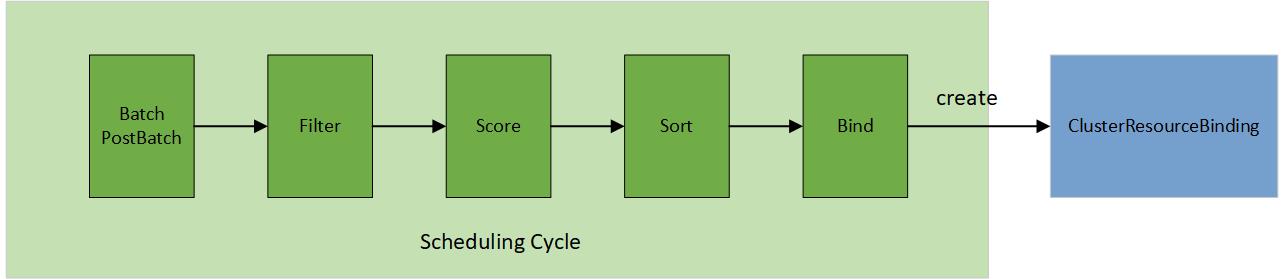
In contrast to the original scheduler framework in Kubernetes, the multi-cluster scheduling process involves selecting a cluster for placement through a structured 5-step operation:
- Batch & PostBatch
- Filter
- Score
- Sort
- Bind
The batch & postBatch step is to define the batch size according to the desired and current ClusterResourceBinding.
The postBatch is to adjust the batch size if needed.
The filter step finds the set of clusters where it’s feasible to schedule the placement, for example, whether the cluster
is matching required Affinity scheduling rules specified in the Policy. It also filters out any clusters which are
leaving the fleet or no longer connected to the fleet, for example, its heartbeat has been stopped for a prolonged period of time.
In the score step (only applied to the pickN type), the scheduler assigns a score to each cluster that survived filtering. Each cluster is given a topology spread score (how much a cluster would satisfy the topology spread constraints specified by the user), and an affinity score (how much a cluster would satisfy the preferred affinity terms specified by the user).
In the sort step (only applied to the pickN type), it sorts all eligible clusters by their scores, sorting first by topology spread score and breaking ties based on the affinity score.
The bind step is to create/update/delete the ClusterResourceBinding based on the desired and current member cluster list.
Strategy
Rollout strategy
Use rollout strategy to control how KubeFleet rolls out a resource change made on the hub cluster to all member clusters. Right now KubeFleet supports two types of rollout strategies out of the box:
- Rolling update: this rollout strategy helps roll out changes incrementally in a way that ensures system availability, akin to how the Kubernetes Deployment API handles updates. For more information, see the Safe Rollout concept.
- Staged update: this rollout strategy helps roll out changes in different stages; users may group clusters into different stages and specify the order in which each stage receives the update. The strategy also allows users to set up timed or approval-based gates between stages to fine-control the flow. For more information, see the Staged Update concept and Staged Update How-To Guide.
Apply strategy
Use apply strategy to control how KubeFleet applies a resource to a member cluster. KubeFleet currently features three different types of apply strategies:
- Client-side apply: this apply strategy sets up KubeFleet to apply resources in a three-way merge that is similar to how
the Kubernetes CLI,
kubectl, performs client-side apply. - Server-side apply: this apply strategy sets up KubeFleet to apply resources via the new server-side apply mechanism.
- Report Diff mode: this apply strategy instructs KubeFleet to check for configuration differences between the resource on the hub cluster and its counterparts among the member clusters; no apply op will be performed. For more information, see the ReportDiff Mode How-To Guide.
To learn more about the differences between client-side apply and server-side apply, see also the Kubernetes official documentation.
KubeFleet apply strategy is also the place where users can set up KubeFleet’s drift detection capabilities and takeover settings:
- Drift detection helps users identify and resolve configuration drifts that are commonly observed in a multi-cluster environment; through this feature, KubeFleet can detect the presence of drifts, reveal their details, and let users decide how and when to handle them. See the Drift Detection How-To Guide for more information.
- Takeover settings allows users to decide how KubeFleet can best handle pre-existing resources. When you join a cluster with running workloads into a fleet, these settings can help bring the workloads under KubeFleet’s management in a way that avoids interruptions. For specifics, see the Takeover Settings How-To Guide.
Placement status
After a ClusterResourcePlacement is created, details on current status can be seen by performing a kubectl describe crp <name>.
The status output will indicate both placement conditions and individual placement statuses on each member cluster that was selected.
The list of resources that are selected for placement will also be included in the describe output.
Sample output:
Name:         crp-1
Namespace:
Labels:       <none>
Annotations:  <none>
API Version:  placement.kubernetes-fleet.io/v1
Kind:         ClusterResourcePlacement
Metadata:
  ...
Spec:
  Policy:
    Placement Type:  PickAll
  Resource Selectors:
    Group:
    Kind:                  Namespace
    Name:                  application-1
    Version:               v1
  Revision History Limit:  10
  Strategy:
    Rolling Update:
      Max Surge:                   25%
      Max Unavailable:             25%
      Unavailable Period Seconds:  2
    Type:                          RollingUpdate
Status:
  Conditions:
    Last Transition Time:   2024-04-29T09:58:20Z
    Message:                found all the clusters needed as specified by the scheduling policy
    Observed Generation:    1
    Reason:                 SchedulingPolicyFulfilled
    Status:                 True
    Type:                   ClusterResourcePlacementScheduled
    Last Transition Time:   2024-04-29T09:58:20Z
    Message:                All 3 cluster(s) start rolling out the latest resource
    Observed Generation:    1
    Reason:                 RolloutStarted
    Status:                 True
    Type:                   ClusterResourcePlacementRolloutStarted
    Last Transition Time:   2024-04-29T09:58:20Z
    Message:                No override rules are configured for the selected resources
    Observed Generation:    1
    Reason:                 NoOverrideSpecified
    Status:                 True
    Type:                   ClusterResourcePlacementOverridden
    Last Transition Time:   2024-04-29T09:58:20Z
    Message:                Works(s) are succcesfully created or updated in the 3 target clusters' namespaces
    Observed Generation:    1
    Reason:                 WorkSynchronized
    Status:                 True
    Type:                   ClusterResourcePlacementWorkSynchronized
    Last Transition Time:   2024-04-29T09:58:20Z
    Message:                The selected resources are successfully applied to 3 clusters
    Observed Generation:    1
    Reason:                 ApplySucceeded
    Status:                 True
    Type:                   ClusterResourcePlacementApplied
    Last Transition Time:   2024-04-29T09:58:20Z
    Message:                The selected resources in 3 cluster are available now
    Observed Generation:    1
    Reason:                 ResourceAvailable
    Status:                 True
    Type:                   ClusterResourcePlacementAvailable
  Observed Resource Index:  0
  Placement Statuses:
    Cluster Name:  kind-cluster-1
    Conditions:
      Last Transition Time:  2024-04-29T09:58:20Z
      Message:               Successfully scheduled resources for placement in kind-cluster-1 (affinity score: 0, topology spread score: 0): picked by scheduling policy
      Observed Generation:   1
      Reason:                Scheduled
      Status:                True
      Type:                  Scheduled
      Last Transition Time:  2024-04-29T09:58:20Z
      Message:               Detected the new changes on the resources and started the rollout process
      Observed Generation:   1
      Reason:                RolloutStarted
      Status:                True
      Type:                  RolloutStarted
      Last Transition Time:  2024-04-29T09:58:20Z
      Message:               No override rules are configured for the selected resources
      Observed Generation:   1
      Reason:                NoOverrideSpecified
      Status:                True
      Type:                  Overridden
      Last Transition Time:  2024-04-29T09:58:20Z
      Message:               All of the works are synchronized to the latest
      Observed Generation:   1
      Reason:                AllWorkSynced
      Status:                True
      Type:                  WorkSynchronized
      Last Transition Time:  2024-04-29T09:58:20Z
      Message:               All corresponding work objects are applied
      Observed Generation:   1
      Reason:                AllWorkHaveBeenApplied
      Status:                True
      Type:                  Applied
      Last Transition Time:  2024-04-29T09:58:20Z
      Message:               The availability of work object crp-1-work is not trackable
      Observed Generation:   1
      Reason:                WorkNotTrackable
      Status:                True
      Type:                  Available
    Cluster Name:            kind-cluster-2
    Conditions:
      Last Transition Time:  2024-04-29T09:58:20Z
      Message:               Successfully scheduled resources for placement in kind-cluster-2 (affinity score: 0, topology spread score: 0): picked by scheduling policy
      Observed Generation:   1
      Reason:                Scheduled
      Status:                True
      Type:                  Scheduled
      Last Transition Time:  2024-04-29T09:58:20Z
      Message:               Detected the new changes on the resources and started the rollout process
      Observed Generation:   1
      Reason:                RolloutStarted
      Status:                True
      Type:                  RolloutStarted
      Last Transition Time:  2024-04-29T09:58:20Z
      Message:               No override rules are configured for the selected resources
      Observed Generation:   1
      Reason:                NoOverrideSpecified
      Status:                True
      Type:                  Overridden
      Last Transition Time:  2024-04-29T09:58:20Z
      Message:               All of the works are synchronized to the latest
      Observed Generation:   1
      Reason:                AllWorkSynced
      Status:                True
      Type:                  WorkSynchronized
      Last Transition Time:  2024-04-29T09:58:20Z
      Message:               All corresponding work objects are applied
      Observed Generation:   1
      Reason:                AllWorkHaveBeenApplied
      Status:                True
      Type:                  Applied
      Last Transition Time:  2024-04-29T09:58:20Z
      Message:               The availability of work object crp-1-work is not trackable
      Observed Generation:   1
      Reason:                WorkNotTrackable
      Status:                True
      Type:                  Available
    Cluster Name:            kind-cluster-3
    Conditions:
      Last Transition Time:  2024-04-29T09:58:20Z
      Message:               Successfully scheduled resources for placement in kind-cluster-3 (affinity score: 0, topology spread score: 0): picked by scheduling policy
      Observed Generation:   1
      Reason:                Scheduled
      Status:                True
      Type:                  Scheduled
      Last Transition Time:  2024-04-29T09:58:20Z
      Message:               Detected the new changes on the resources and started the rollout process
      Observed Generation:   1
      Reason:                RolloutStarted
      Status:                True
      Type:                  RolloutStarted
      Last Transition Time:  2024-04-29T09:58:20Z
      Message:               No override rules are configured for the selected resources
      Observed Generation:   1
      Reason:                NoOverrideSpecified
      Status:                True
      Type:                  Overridden
      Last Transition Time:  2024-04-29T09:58:20Z
      Message:               All of the works are synchronized to the latest
      Observed Generation:   1
      Reason:                AllWorkSynced
      Status:                True
      Type:                  WorkSynchronized
      Last Transition Time:  2024-04-29T09:58:20Z
      Message:               All corresponding work objects are applied
      Observed Generation:   1
      Reason:                AllWorkHaveBeenApplied
      Status:                True
      Type:                  Applied
      Last Transition Time:  2024-04-29T09:58:20Z
      Message:               The availability of work object crp-1-work is not trackable
      Observed Generation:   1
      Reason:                WorkNotTrackable
      Status:                True
      Type:                  Available
  Selected Resources:
    Kind:       Namespace
    Name:       application-1
    Version:    v1
    Kind:       ConfigMap
    Name:       app-config-1
    Namespace:  application-1
    Version:    v1
Events:
  Type    Reason                        Age    From                                   Message
  ----    ------                        ----   ----                                   -------
  Normal  PlacementRolloutStarted       3m46s  cluster-resource-placement-controller  Started rolling out the latest resources
  Normal  PlacementOverriddenSucceeded  3m46s  cluster-resource-placement-controller  Placement has been successfully overridden
  Normal  PlacementWorkSynchronized     3m46s  cluster-resource-placement-controller  Work(s) have been created or updated successfully for the selected cluster(s)
  Normal  PlacementApplied              3m46s  cluster-resource-placement-controller  Resources have been applied to the selected cluster(s)
  Normal  PlacementRolloutCompleted     3m46s  cluster-resource-placement-controller  Resources are available in the selected clusters
ClusterResourcePlacementStatus
The ClusterResourcePlacementStatus (CRPS) is a namespaced resource that mirrors the PlacementStatus of a corresponding cluster-scoped ClusterResourcePlacement (CRP) object. It provides namespace-scoped access to cluster-scoped placement status information.
- Namespace-scoped access: Allows users with namespace-level permissions to view placement status without requiring cluster-scoped access
- Status mirroring: Contains the same placement status information as the parent CRP, but accessible within a specific namespace
- Optional feature: Only created when
StatusReportingScopeis set toNamespaceAccessible. Once set,StatusReportingScopeis immutable.
When StatusReportingScope is set to NamespaceAccessible for aClusterResourcePlacement, only one namespace resource selector is allowed, and it is immutable. Therefore, the namespace resource selector cannot be changed after creation.
For detailed instructions, please refer to this document.
Advanced Features
Tolerations
Tolerations are a mechanism to allow the KubeFleet Scheduler to schedule resources to a MemberCluster that has taints specified on it.
We adopt the concept of taints & tolerations
introduced in Kubernetes to the multi-cluster use case.
The ClusterResourcePlacement CR supports the specification of list of tolerations, which are applied to the ClusterResourcePlacement
object. Each Toleration object comprises the following fields:
key: The key of the toleration.value: The value of the toleration.effect: The effect of the toleration, which can beNoSchedulefor now.operator: The operator of the toleration, which can beExistsorEqual.
Each toleration is used to tolerate one or more specific taints applied on the MemberCluster. Once all taints on a MemberCluster
are tolerated by tolerations on a ClusterResourcePlacement, resources can be propagated to the MemberCluster by the scheduler for that
ClusterResourcePlacement resource.
Tolerations cannot be updated or removed from a ClusterResourcePlacement. If there is a need to update toleration a better approach is to
add another toleration. If we absolutely need to update or remove existing tolerations, the only option is to delete the existing ClusterResourcePlacement
and create a new object with the updated tolerations.
For detailed instructions, please refer to this document.
Envelope Object
The ClusterResourcePlacement leverages the fleet hub cluster as a staging environment for customer resources. These resources are then propagated to member clusters that are part of the fleet, based on the ClusterResourcePlacement spec.
In essence, the objective is not to apply or create resources on the hub cluster for local use but to propagate these resources to other member clusters within the fleet.
Certain resources, when created or applied on the hub cluster, may lead to unintended side effects. These include:
- Validating/Mutating Webhook Configurations
- Cluster Role Bindings
- Resource Quotas
- Storage Classes
- Flow Schemas
- Priority Classes
- Ingress Classes
- Ingresses
- Network Policies
To address this, KubeFleet provides dedicated envelope custom resources that wrap these manifests without applying them on the hub cluster:
ClusterResourceEnvelopefor cluster-scoped resourcesResourceEnvelopefor namespace-scoped resources
These envelope resources replace the older ConfigMap-based envelope pattern for new placements and let you propagate side-effecting resources safely to member clusters. For detailed instructions, please refer to this document.
4 - ResourcePlacement
Concept about the ResourcePlacement API
Overview
ResourcePlacement is a namespace-scoped API that enables dynamic selection and multi-cluster propagation of namespace-scoped resources. It provides fine-grained control over how specific resources within a namespace are distributed across member clusters in a fleet.
Key Characteristics:
- Namespace-scoped: Both the ResourcePlacement object and the resources it manages exist within the same namespace
- Selective: Can target specific resources by type, name, or labels rather than entire namespaces
- Declarative: Uses the same placement patterns as ClusterResourcePlacement for consistent behavior
A ResourcePlacement consists of three core components:
- Resource Selectors: Define which namespace-scoped resources to include
- Placement Policy: Determine target clusters using PickAll, PickFixed, or PickN strategies
- Rollout Strategy: Control how changes propagate across selected clusters
For detailed examples and implementation guidance, see the ResourcePlacement How-To Guide.
Motivation
In multi-cluster environments, workloads often consist of both cluster-scoped and namespace-scoped resources that need to be distributed across different clusters. While ClusterResourcePlacement (CRP) handles cluster-scoped resources effectively, particularly entire namespaces and their contents, there are scenarios where you need more granular control over namespace-scoped resources within existing namespaces.
ResourcePlacement (RP) was designed to address this gap by providing:
- Namespace-scoped resource management: Target specific resources within a namespace without affecting the entire namespace
- Operational flexibility: Allow a team to manage different resources within the same namespace independently
- Complementary functionality: Work alongside CRP to provide a complete multi-cluster resource management solution
Note: ResourcePlacement can be used together with ClusterResourcePlacement in namespace-only mode. For example, you can use CRP to deploy the namespace, while using RP for fine-grained management of specific resources like environment-specific ConfigMaps or Secrets within that namespace.
Addressing Real-World Namespace Usage Patterns
While CRP assumes that namespaces represent application boundaries, real-world usage patterns are often more complex. Organizations frequently use namespaces as team boundaries rather than application boundaries, leading to several challenges that ResourcePlacement directly addresses:
Multi-Application Namespaces: In many organizations, a single namespace contains multiple independent applications owned by the same team. These applications may have:
- Different lifecycle requirements (one application may need frequent updates while another remains stable)
- Different cluster placement needs (development vs. production applications)
- Independent scaling and resource requirements
- Separate compliance or governance requirements
Individual Scheduling Decisions: Many workloads, particularly AI/ML jobs, require individual scheduling decisions:
- AI Jobs: Machine learning workloads often consist of short-lived, resource-intensive jobs that need to be scheduled based on cluster resource availability, GPU availability, or data locality
- Batch Workloads: Different batch jobs within the same namespace may target different cluster types based on computational requirements
Complete Application Team Control: ResourcePlacement provides application teams with direct control over their resource placement without requiring platform team intervention:
- Self-Service Operations: Teams can manage their own resource distribution strategies
- Independent Deployment Cycles: Different applications within a namespace can have completely independent rollout schedules
- Granular Override Capabilities: Teams can customize resource configurations per cluster without affecting other applications in the namespace
This granular approach ensures that ResourcePlacement can adapt to diverse organizational structures and workload patterns while maintaining the simplicity and power of the Fleet scheduling framework.
Key Differences Between ResourcePlacement and ClusterResourcePlacement
| Aspect | ResourcePlacement (RP) | ClusterResourcePlacement (CRP) |
|---|---|---|
| Scope | Namespace-scoped resources only | Cluster-scoped resources (especially namespaces and their contents) |
| Resource | Namespace-scoped API object | Cluster-scoped API object |
| Selection Boundary | Limited to resources within the same namespace as the RP | Can select any cluster-scoped resource |
| Typical Use Cases | AI/ML Jobs, individual workloads, specific ConfigMaps/Secrets that need independent placement decisions | Application bundles, entire namespaces, cluster-wide policies |
| Team Ownership | Can be managed by namespace owners/developers | Typically managed by platform operators |
Similarities Between ResourcePlacement and ClusterResourcePlacement
Both RP and CRP share the same core concepts and capabilities:
- Placement Policies: Same three placement types (PickAll, PickFixed, PickN) with identical scheduling logic
- Resource Selection: Both support selection by group/version/kind, name, and label selectors
- Rollout Strategy: Identical rolling update mechanisms for zero-downtime deployments
- Scheduling Framework: Use the same multi-cluster scheduler with filtering, scoring, and binding phases
- Override Support: Both integrate with ClusterResourceOverride and ResourceOverride for resource customization
- Status Reporting: Similar status structures and condition types for placement tracking
- Tolerations: Same taints and tolerations mechanism for cluster selection
- Snapshot Architecture: Both use immutable snapshots (ResourceSnapshot vs ClusterResourceSnapshot) for resource and policy tracking
This design allows teams familiar with one placement object to easily understand and use the other, while providing the appropriate level of control for different resource scopes.
When To Use ResourcePlacement
ResourcePlacement is ideal for scenarios requiring granular control over namespace-scoped resources:
- Selective Resource Distribution: Deploy specific ConfigMaps, Secrets, or Services without affecting the entire namespace
- Multi-tenant Environments: Allow different teams to manage their resources independently within shared namespaces
- Configuration Management: Distribute environment-specific configurations across different cluster environments
- Compliance and Governance: Apply different policies to different resource types within the same namespace
- Progressive Rollouts: Safely deploy resource updates across clusters with zero-downtime strategies
For practical examples and step-by-step instructions, see the ResourcePlacement How-To Guide.
Working with ClusterResourcePlacement
ResourcePlacement is designed to work in coordination with ClusterResourcePlacement (CRP) to provide a complete multi-cluster resource management solution. Understanding this relationship is crucial for effective fleet management.
Namespace Prerequisites
Important: ResourcePlacement can only place namespace-scoped resources to clusters that already have the target namespace. This creates a fundamental dependency on ClusterResourcePlacement for namespace establishment.
Typical Workflow:
- Fleet Admin: Uses ClusterResourcePlacement to deploy namespaces across the fleet
- Application Teams: Use ResourcePlacement to manage specific resources within those established namespaces
# Fleet admin creates namespace using CRP
apiVersion: placement.kubernetes-fleet.io/v1
kind: ClusterResourcePlacement
metadata:
  name: app-namespace-crp
spec:
  resourceSelectors:
    - group: ""
      kind: Namespace
      name: my-app
      version: v1
      selectionScope: NamespaceOnly # only namespace itself is placed, no resources within the namespace
  policy:
    placementType: PickAll
---
# Application team manages resources using RP
apiVersion: placement.kubernetes-fleet.io/v1
kind: ResourcePlacement
metadata:
  name: app-configs-rp
  namespace: my-app
spec:
  resourceSelectors:
    - group: ""
      kind: ConfigMap
      version: v1
      labelSelector:
        matchLabels:
          app: my-application
  policy:
    placementType: PickFixed
    clusterNames: ["prod-cluster-1", "prod-cluster-2"]
Best Practices
- Establish Namespaces First: Always ensure namespaces are deployed via CRP before creating ResourcePlacement objects
- Monitor Dependencies: Use Fleet monitoring to ensure namespace-level CRPs are healthy before deploying dependent RPs
- Coordinate Policies: Align CRP and RP placement policies to avoid conflicts (e.g., if CRP places namespace on clusters A,B,C, RP can target any subset of those clusters)
- Team Boundaries: Use CRP for platform-managed resources (namespaces, RBAC) and RP for application-managed resources (app configs, secrets)
This coordinated approach ensures that ResourcePlacement provides the flexibility teams need while maintaining the foundational infrastructure managed by platform operators.
Core Concepts
ResourcePlacement orchestrates multi-cluster resource distribution through a coordinated system of controllers and snapshots that work together to ensure consistent, reliable deployments.
The Complete Flow
When you create a ResourcePlacement, the system initiates a multi-stage process:
- Resource Selection & Snapshotting: The placement controller identifies resources matching your selectors and creates immutable
ResourceSnapshotobjects capturing their current state - Policy Evaluation & Snapshotting: Placement policies are evaluated and captured in
SchedulingPolicySnapshotobjects to ensure stable scheduling decisions - Multi-Cluster Scheduling: The scheduler processes policy snapshots to determine target clusters through filtering, scoring, and selection
- Resource Binding: Selected clusters are bound to specific resource snapshots via
ResourceBindingobjects - Rollout Execution: The rollout controller applies resources to target clusters according to the rollout strategy
- Override Processing: Environment-specific customizations are applied through override controllers
- Work Generation: Individual
Workobjects are created for each target cluster containing the final resource manifests - Cluster Application: Work controllers on member clusters apply the resources locally and report status back
Status and Observability
ResourcePlacement provides comprehensive status reporting to track deployment progress:
- Overall Status: High-level conditions indicating scheduling, rollout, and availability states
- Per-Cluster Status: Individual status for each target cluster showing detailed progress
- Events: Timeline of placement activities and any issues encountered
Status information helps operators understand deployment progress, troubleshoot issues, and ensure resources are successfully propagated across the fleet.
For detailed troubleshooting guidance, see the ResourcePlacement Troubleshooting Guide.
Advanced Features
ResourcePlacement supports the same advanced features as ClusterResourcePlacement. For detailed documentation on these features, see the corresponding sections in the ClusterResourcePlacement Concept Guide - Advanced Features.
5 - Scheduler
Concept about the Fleet scheduler
The scheduler component is a vital element in Fleet workload scheduling. Its primary responsibility is to determine the
schedule decision for a bundle of resources based on the latest ClusterSchedulingPolicySnapshotgenerated by the ClusterResourcePlacement.
By default, the scheduler operates in batch mode, which enhances performance. In this mode, it binds a ClusterResourceBinding
from a ClusterResourcePlacement to multiple clusters whenever possible.
Batch in nature
Scheduling resources within a ClusterResourcePlacement involves more dependencies compared with scheduling pods within
a deployment in Kubernetes. There are two notable distinctions:
- In a
ClusterResourcePlacement, multiple replicas of resources cannot be scheduled on the same cluster, whereas pods belonging to the same deployment in Kubernetes can run on the same node. - The
ClusterResourcePlacementsupports different placement types within a single object.
These requirements necessitate treating the scheduling policy as a whole and feeding it to the scheduler, as opposed to handling individual pods like Kubernetes today. Specially:
- Scheduling the entire
ClusterResourcePlacementat once enables us to increase the parallelism of the scheduler if needed. - Supporting the
PickAllmode would require generating the replica for each cluster in the fleet to scheduler. This approach is not only inefficient but can also result in scheduler repeatedly attempting to schedule unassigned replica when there are no possibilities of placing them. - To support the
PickNmode, the scheduler needs to compute the filtering and scoring for each replica. Conversely, in batch mode, these calculations are performed once. Scheduler sorts all the eligible clusters and pick the top N clusters.
Placement Decisions
The output of the scheduler is an array of ClusterResourceBindings on the hub cluster.
ClusterResourceBinding sample:
apiVersion: placement.kubernetes-fleet.io/v1beta1
kind: ClusterResourceBinding
metadata:
  annotations:
    kubernetes-fleet.io/previous-binding-state: Bound
  creationTimestamp: "2023-11-06T09:53:11Z"
  finalizers:
  - kubernetes-fleet.io/work-cleanup
  generation: 8
  labels:
    kubernetes-fleet.io/parent-CRP: crp-1
  name: crp-1-aks-member-1-2f8fe606
  resourceVersion: "1641949"
  uid: 3a443dec-a5ad-4c15-9c6d-05727b9e1d15
spec:
  clusterDecision:
    clusterName: aks-member-1
    clusterScore:
      affinityScore: 0
      priorityScore: 0
    reason: picked by scheduling policy
    selected: true
  resourceSnapshotName: crp-1-4-snapshot
  schedulingPolicySnapshotName: crp-1-1
  state: Bound
  targetCluster: aks-member-1
status:
  conditions:
  - lastTransitionTime: "2023-11-06T09:53:11Z"
    message: ""
    observedGeneration: 8
    reason: AllWorkSynced
    status: "True"
    type: Bound
  - lastTransitionTime: "2023-11-10T08:23:38Z"
    message: ""
    observedGeneration: 8
    reason: AllWorkHasBeenApplied
    status: "True"
    type: Applied
ClusterResourceBinding can have three states:
- Scheduled: It indicates that the scheduler has selected this cluster for placing the resources. The resource is waiting to be picked up by the rollout controller.
- Bound: It indicates that the rollout controller has initiated the placement of resources on the target cluster. The resources are actively being deployed.
- Unscheduled: This states signifies that the target cluster is no longer selected by the scheduler for the placement. The resource associated with this cluster are in the process of being removed. They are awaiting deletion from the cluster.
The scheduler operates by generating scheduling decisions through the creating of new bindings in the “scheduled” state and the removal of existing bindings by marking them as “unscheduled”. There is a separate rollout controller which is responsible for executing these decisions based on the defined rollout strategy.
Enforcing the semantics of “IgnoreDuringExecutionTime”
The ClusterResourcePlacement enforces the semantics of “IgnoreDuringExecutionTime” to prioritize the stability of resources
running in production. Therefore, the resources should not be moved or rescheduled without explicit changes to the scheduling
policy.
Here are some high-level guidelines outlining the actions that trigger scheduling and corresponding behavior:
Policychanges trigger scheduling:- The scheduler makes the placement decisions based on the latest
ClusterSchedulingPolicySnapshot. - When it’s just a scale out operation (
NumberOfClustersof pickN mode is increased), theClusterResourcePlacementcontroller updates the label of the existingClusterSchedulingPolicySnapshotinstead of creating a new one, so that the scheduler won’t move any existing resources that are already scheduled and just fulfill the new requirement.
- The scheduler makes the placement decisions based on the latest
The following cluster changes trigger scheduling:
- a cluster, originally ineligible for resource placement for some reason, becomes eligible, such as:
- the cluster setting changes, specifically
MemberClusterlabels has changed - an unexpected deployment which originally leads the scheduler to discard the cluster (for example, agents not joining, networking issues, etc.) has been resolved
- the cluster setting changes, specifically
- a cluster, originally eligible for resource placement, is leaving the fleet and becomes ineligible
Note: The scheduler is only going to place the resources on the new cluster and won’t touch the existing clusters.
- a cluster, originally ineligible for resource placement for some reason, becomes eligible, such as:
Resource-only changes do not trigger scheduling including:
ResourceSelectorsis updated in theClusterResourcePlacementspec.- The selected resources is updated without directly affecting the
ClusterResourcePlacement.
What’s next
- Read about Scheduling Framework
6 - Scheduling Framework
Concept about the Fleet scheduling framework
The fleet scheduling framework closely aligns with the native Kubernetes scheduling framework, incorporating several modifications and tailored functionalities.
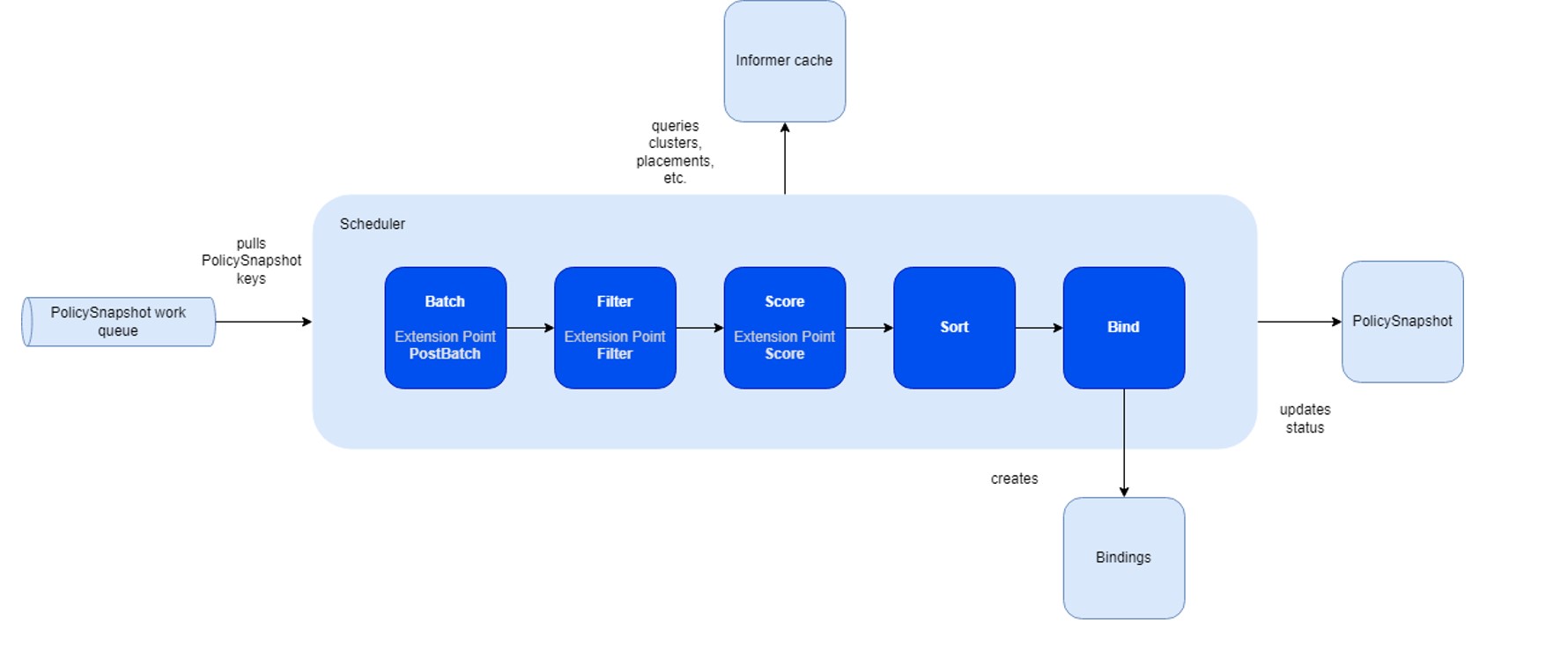
The primary advantage of this framework lies in its capability to compile plugins directly into the scheduler. Its API facilitates the implementation of diverse scheduling features as plugins, thereby ensuring a lightweight and maintainable core.
The fleet scheduler integrates three fundamental built-in plugin types:
- Topology Spread Plugin: Supports the TopologySpreadConstraints stipulated in the placement policy.
- Cluster Affinity Plugin: Facilitates the Affinity clause of the placement policy.
- Same Placement Affinity Plugin: Uniquely designed for the fleet, preventing multiple replicas (selected resources) from being placed within the same cluster. This distinguishes it from Kubernetes, which allows multiple pods on a node.
- Cluster Eligibility Plugin: Enables cluster selection based on specific status criteria.
- Taint & Toleration Plugin: Enables cluster selection based on taints on the cluster & tolerations on the ClusterResourcePlacement.
Compared to the Kubernetes scheduling framework, the fleet framework introduces additional stages for the pickN placement type:
- Batch & PostBatch:
- Batch: Defines the batch size based on the desired and current
ClusterResourceBinding. - PostBatch: Adjusts the batch size as necessary. Unlike the Kubernetes scheduler, which schedules pods individually (batch size = 1).
- Batch: Defines the batch size based on the desired and current
- Sort:
- Fleet’s sorting mechanism selects a number of clusters, whereas Kubernetes’ scheduler prioritizes nodes with the highest scores.
To streamline the scheduling framework, certain stages, such as permit and reserve, have been omitted due to the absence
of corresponding plugins or APIs enabling customers to reserve or permit clusters for specific placements. However, the
framework remains designed for easy extension in the future to accommodate these functionalities.
In-tree plugins
The scheduler includes default plugins, each associated with distinct extension points:
| Plugin | PostBatch | Filter | Score |
|---|---|---|---|
| Cluster Affinity | ❌ | ✅ | ✅ |
| Same Placement Anti-affinity | ❌ | ✅ | ❌ |
| Topology Spread Constraints | ✅ | ✅ | ✅ |
| Cluster Eligibility | ❌ | ✅ | ❌ |
| Taint & Toleration | ❌ | ✅ | ❌ |
The Cluster Affinity Plugin serves as an illustrative example and operates within the following extension points:
- PreFilter: Verifies whether the policy contains any required cluster affinity terms. If absent, the plugin bypasses the subsequent Filter stage.
- Filter: Filters out clusters that fail to meet the specified required cluster affinity terms outlined in the policy.
- PreScore: Determines if the policy includes any preferred cluster affinity terms. If none are found, this plugin will be skipped during the Score stage.
- Score: Assigns affinity scores to clusters based on compliance with the preferred cluster affinity terms stipulated in the policy.
7 - Properties and Property Providers
Concept about cluster properties and property providers
This document explains the concepts of property provider and cluster properties in Fleet.
Fleet allows developers to implement a property provider to expose arbitrary properties about a member cluster, such as its node count and available resources for workload placement. Platforms could also enable their property providers to expose platform-specific properties via Fleet. These properties can be useful in a variety of cases: for example, administrators could monitor the health of a member cluster using related properties; Fleet also supports making scheduling decisions based on the property data.
Property provider
A property provider implements Fleet’s property provider interface:
// PropertyProvider is the interface that every property provider must implement.
type PropertyProvider interface {
    // Collect is called periodically by the Fleet member agent to collect properties.
    //
    // Note that this call should complete promptly. Fleet member agent will cancel the
    // context if the call does not complete in time.
    Collect(ctx context.Context) PropertyCollectionResponse

    // Start is called when the Fleet member agent starts up to initialize the property provider.
    // This call should not block.
    //
    // Note that Fleet member agent will cancel the context when it exits.
    Start(ctx context.Context, config *rest.Config) error
}
For the details, see the Fleet source code.
A property provider should be shipped as a part of the Fleet member agent and run alongside it. Refer to the Fleet source code for specifics on how to set it up with the Fleet member agent. At this moment, only one property provider can be set up with the Fleet member agent at a time. Once connected, the Fleet member agent will attempt to start it when the agent itself initializes; the agent will then start collecting properties from the property provider periodically.
A property provider can expose two types of properties: resource properties, and non-resource properties. To learn about the two types, see the section below. In addition, the provider can choose to report its status, such as any errors encountered when preparing the properties, in the form of Kubernetes conditions.
The Fleet member agent can run with or without a property provider. If a provider is not set up, or the given provider fails to start properly, the agent will collect limited properties about the cluster on its own, specifically the node count, plus the total/allocatable CPU and memory capacities of the host member cluster.
Cluster properties
A cluster property is an attribute of a member cluster. There are two types of properties:
Resource property: the usage information of a resource in a member cluster, which consists of:
the total capacity of the resource, which is the amount of the resource installed in the cluster;
the allocatable capacity of the resource, which is the maximum amount of the resource that can be used for running user workloads, as some amount of the resource might be reserved by the OS, kubelet, etc.;
the available capacity of the resource, which is the amount of the resource that is currently free for running user workloads.
Note that you may report a virtual resource via the property provider, if applicable.
Non-resource property: a value that describes a member cluster.
A property is uniquely identified by its name, which is formatted as a string of one or more
segments, separated by slashes (/). Each segment must be 63 characters or less, start and end
with an alphanumeric character, and can include dashes (-), underscores (_), dots (.), and
alphanumerics in between. Optionally, the property name can have a prefix, which must be a DNS
subdomain up to 253 characters, followed by a slash (/). Below are some examples of valid
property names:
cpumemorykubernetes-fleet.io/node-countkubernetes.azure.com/skus/Standard_B4ms/count
Eventually, all cluster properties are exposed via the Fleet MemberCluster API, with the
non-resource properties in the .status.properties field and the resource properties
.status.resourceUsage field:
apiVersion: cluster.kubernetes-fleet.io/v1beta1
kind: MemberCluster
metadata: ...
spec: ...
status:
  agentStatus: ...
  conditions: ...
  properties:
    kubernetes-fleet.io/node-count:
      observationTime: "2024-04-30T14:54:24Z"
      value: "2"
    ...
  resourceUsage:
    allocatable:
      cpu: 32
      memory: "16Gi"
    available:
      cpu: 2
      memory: "800Mi"
    capacity:
      cpu: 40
      memory: "20Gi"
Note that conditions reported by the property provider (if any), would be available in the
.status.conditions array as well.
Core properties
The following properties are considered core properties in Fleet, which should be supported in all property provider implementations. Fleet agents will collect them even when no property provider has been set up.
| Property Type | Name | Description |
|---|---|---|
| Non-resource property | kubernetes-fleet.io/node-count | The number of nodes in a cluster. |
| Resource property | cpu | The usage information (total, allocatable, and available capacity) of CPU resource in a cluster. |
| Resource property | memory | The usage information (total, allocatable, and available capacity) of memory resource in a cluster. |
8 - Safe Rollout
Concept about rolling out changes safely in Fleet
One of the most important features of Fleet is the ability to safely rollout changes across multiple clusters. We do this by rolling out the changes in a controlled manner, ensuring that we only continue to propagate the changes to the next target clusters if the resources are successfully applied to the previous target clusters.
Overview
We automatically propagate any resource changes that are selected by a ClusterResourcePlacement from the hub cluster
to the target clusters based on the placement policy defined in the ClusterResourcePlacement. In order to reduce the
blast radius of such operation, we provide users a way to safely rollout the new changes so that a bad release
won’t affect all the running instances all at once.
Rollout Strategy
We currently only support the RollingUpdate rollout strategy. It updates the resources in the selected target clusters
gradually based on the maxUnavailable and maxSurge settings.
In place update policy
We always try to do in-place update by respecting the rollout strategy if there is no change in the placement. This is to avoid unnecessary interrupts to the running workloads when there is only resource changes. For example, if you only change the tag of the deployment in the namespace you want to place, we will do an in-place update on the deployments already placed on the targeted cluster instead of moving the existing deployments to other clusters even if the labels or properties of the current clusters are not the best to match the current placement policy.
How To Use RollingUpdateConfig
RolloutUpdateConfig is used to control behavior of the rolling update strategy.
MaxUnavailable and MaxSurge
MaxUnavailable specifies the maximum number of connected clusters to the fleet compared to target number of clusters
specified in ClusterResourcePlacement policy in which resources propagated by the ClusterResourcePlacement can be
unavailable. Minimum value for MaxUnavailable is set to 1 to avoid stuck rollout during in-place resource update.
MaxSurge specifies the maximum number of clusters that can be scheduled with resources above the target number of clusters
specified in ClusterResourcePlacement policy.
Note:
MaxSurgeonly applies to rollouts to newly scheduled clusters, and doesn’t apply to rollouts of workload triggered by updates to already propagated resource. For updates to already propagated resources, we always try to do the updates in place with no surge.
target number of clusters changes based on the ClusterResourcePlacement policy.
- For PickAll, it’s the number of clusters picked by the scheduler.
- For PickN, it’s the number of clusters specified in the
ClusterResourcePlacementpolicy. - For PickFixed, it’s the length of the list of cluster names specified in the
ClusterResourcePlacementpolicy.
Example 1
Consider a fleet with 4 connected member clusters (cluster-1, cluster-2, cluster-3 & cluster-4) where every member
cluster has label env: prod. The hub cluster has a namespace called test-ns with a deployment in it.
The ClusterResourcePlacement spec is defined as follows:
spec:
  resourceSelectors:
    - group: ""
      kind: Namespace
      version: v1
      name: test-ns
  policy:
    placementType: PickN
    numberOfClusters: 3
    affinity:
      clusterAffinity:
        requiredDuringSchedulingIgnoredDuringExecution:
          clusterSelectorTerms:
            - labelSelector:
                matchLabels:
                  env: prod
  strategy:
    rollingUpdate:
      maxUnavailable: 1
      maxSurge: 1
The rollout will be as follows:
We try to pick 3 clusters out of 4, for this scenario let’s say we pick cluster-1, cluster-2 & cluster-3.
Since we can’t track the initial availability for the deployment, we rollout the namespace with deployment to cluster-1, cluster-2 & cluster-3.
Then we update the deployment with a bad image name to update the resource in place on cluster-1, cluster-2 & cluster-3.
But since we have
maxUnavailableset to 1, we will rollout the bad image name update for deployment to one of the clusters (which cluster the resource is rolled out to first is non-deterministic).Once the deployment is updated on the first cluster, we will wait for the deployment’s availability to be true before rolling out to the other clusters
And since we rolled out a bad image name update for the deployment it’s availability will always be false and hence the rollout for the other two clusters will be stuck
Users might think
maxSurgeof 1 might be utilized here but in this case since we are updating the resource in placemaxSurgewill not be utilized to surge and pick cluster-4.
Note:
maxSurgewill be utilized to pick cluster-4, if we change the policy to pick 4 cluster or change placement type toPickAll.
Example 2
Consider a fleet with 4 connected member clusters (cluster-1, cluster-2, cluster-3 & cluster-4) where,
- cluster-1 and cluster-2 has label
loc: west - cluster-3 and cluster-4 has label
loc: east
The hub cluster has a namespace called test-ns with a deployment in it.
Initially, the ClusterResourcePlacement spec is defined as follows:
spec:
  resourceSelectors:
    - group: ""
      kind: Namespace
      version: v1
      name: test-ns
  policy:
    placementType: PickN
    numberOfClusters: 2
    affinity:
      clusterAffinity:
        requiredDuringSchedulingIgnoredDuringExecution:
          clusterSelectorTerms:
              - labelSelector:
                  matchLabels:
                    loc: west
  strategy:
    rollingUpdate:
      maxSurge: 2
The rollout will be as follows:
- We try to pick clusters (cluster-1 and cluster-2) by specifying the label selector
loc: west. - Since we can’t track the initial availability for the deployment, we rollout the namespace with deployment to cluster-1 and cluster-2 and wait till they become available.
Then we update the ClusterResourcePlacement spec to the following:
spec:
  resourceSelectors:
    - group: ""
      kind: Namespace
      version: v1
      name: test-ns
  policy:
    placementType: PickN
    numberOfClusters: 2
    affinity:
      clusterAffinity:
        requiredDuringSchedulingIgnoredDuringExecution:
          clusterSelectorTerms:
              - labelSelector:
                  matchLabels:
                    loc: east
  strategy:
    rollingUpdate:
      maxSurge: 2
The rollout will be as follows:
- We try to pick clusters (cluster-3 and cluster-4) by specifying the label selector
loc: east. - But this time around since we have
maxSurgeset to 2 we are saying we can propagate resources to a maximum of 4 clusters but our target number of clusters specified is 2, we will rollout the namespace with deployment to both cluster-3 and cluster-4 before removing the deployment from cluster-1 and cluster-2. - And since
maxUnavailableis always set to 25% by default which is rounded off to 1, we will remove the resource from one of the existing clusters (cluster-1 or cluster-2) because whenmaxUnavailableis 1 the policy mandates at least one cluster to be available.
UnavailablePeriodSeconds
UnavailablePeriodSeconds is used to configure the waiting time between rollout phases when we cannot determine if the
resources have rolled out successfully or not. This field is used only if the availability of resources we propagate
are not trackable. Refer to the Data only object section for more details.
Availability based Rollout
We have built-in mechanisms to determine the availability of some common Kubernetes native resources. We only mark them as available in the target clusters when they meet the criteria we defined.
How It Works
We have an agent running in the target cluster to check the status of the resources. We have specific criteria for each of the following resources to determine if they are available or not. Here are the list of resources we support:
Deployment
We only mark a Deployment as available when all its pods are running, ready and updated according to the latest spec.
DaemonSet
We only mark a DaemonSet as available when all its pods are available and updated according to the latest spec on all
desired scheduled nodes.
StatefulSet
We only mark a StatefulSet as available when all its pods are running, ready and updated according to the latest revision.
Job
We only mark a Job as available when it has at least one succeeded pod or one ready pod.
Service
For Service based on the service type the availability is determined as follows:
- For
ClusterIP&NodePortservice, we mark it as available when a cluster IP is assigned. - For
LoadBalancerservice, we mark it as available when aLoadBalancerIngresshas been assigned along with an IP or Hostname. - For
ExternalNameservice, checking availability is not supported, so it will be marked as available with not trackable reason.
Data only objects
For the objects described below since they are a data resource we mark them as available immediately after creation,
- Namespace
- Secret
- ConfigMap
- Role
- ClusterRole
- RoleBinding
- ClusterRoleBinding
9 - Override
Concept about the override APIs
Overview
The ClusterResourceOverride and ResourceOverride provides a way to customize resource configurations before they are propagated
to the target cluster by the ClusterResourcePlacement.
Difference Between ClusterResourceOverride And ResourceOverride
ClusterResourceOverride represents the cluster-wide policy that overrides the cluster scoped resources to one or more
clusters while ResourceOverride will apply to resources in the same namespace as the namespace-wide policy.
Note: If a namespace is selected by the
ClusterResourceOverride, ALL the resources under the namespace are selected automatically.
If the resource is selected by both ClusterResourceOverride and ResourceOverride, the ResourceOverride will win
when resolving the conflicts.
When To Use Override
Overrides is useful when you want to customize the resources before they are propagated from the hub cluster to the target clusters. Some example use cases are:
- As a platform operator, I want to propagate a clusterRoleBinding to cluster-us-east and cluster-us-west and would like to grant the same role to different groups in each cluster.
- As a platform operator, I want to propagate a clusterRole to cluster-staging and cluster-production and would like to grant more permissions to the cluster-staging cluster than the cluster-production cluster.
- As a platform operator, I want to propagate a namespace to all the clusters and would like to customize the labels for each cluster.
- As an application developer, I would like to propagate a deployment to cluster-staging and cluster-production and would like to always use the latest image in the staging cluster and a specific image in the production cluster.
- As an application developer, I would like to propagate a deployment to all the clusters and would like to use different commands for my container in different regions.
Limits
- Each resource can be only selected by one override simultaneously. In the case of namespace scoped resources, up to two
overrides will be allowed, considering the potential selection through both
ClusterResourceOverride(select its namespace) andResourceOverride. - At most 100
ClusterResourceOverridecan be created. - At most 100
ResourceOverridecan be created.
Placement
This specifies which placement the override should be applied to.
Resource Selector
ClusterResourceSelector of ClusterResourceOverride selects which cluster-scoped resources need to be overridden before
applying to the selected clusters.
It supports the following forms of resource selection:
- Select resources by specifying the <group, version, kind> and name. This selection propagates only one resource that matches the <group, version, kind> and name.
Note: Label selector of
ClusterResourceSelectoris not supported.
ResourceSelector of ResourceOverride selects which namespace-scoped resources need to be overridden before applying to
the selected clusters.
It supports the following forms of resource selection:
- Select resources by specifying the <group, version, kind> and name. This selection propagates only one resource that
matches the <group, version, kind> and name under the
ResourceOverridenamespace.
Override Policy
Override policy defines how to override the selected resources on the target clusters.
It contains an array of override rules and its order determines the override order. For example, when there are two rules selecting the same fields on the target cluster, the last one will win.
Each override rule contains the following fields:
ClusterSelector: which cluster(s) the override rule applies to. It supports the following forms of cluster selection:- Select clusters by specifying the cluster labels.
- An empty selector selects ALL the clusters.
- A nil selector selects NO target cluster.
IMPORTANT: Only
labelSelectoris supported in theclusterSelectorTermsfield.OverrideType: which type of the override should be applied to the selected resources. The default type isJSONPatch.JSONPatch: applies the JSON patch to the selected resources using RFC 6902.Delete: deletes the selected resources on the target cluster.
JSONPatchOverrides: a list of JSON path override rules applied to the selected resources following RFC 6902 when the override type isJSONPatch.
Note: Updating the fields in the TypeMeta (e.g.,
apiVersion,kind) is not allowed.
Note: Updating the fields in the ObjectMeta (e.g.,
name,namespace) excluding annotations and labels is not allowed.
Note: Updating the fields in the Status (e.g.,
status) is not allowed.
Reserved Variables in the JSON Patch Override Value
There is a list of reserved variables that will be replaced by the actual values used in the value of the JSON patch override rule:
${MEMBER-CLUSTER-NAME}: this will be replaced by the name of thememberClusterthat represents this cluster.${MEMBER-CLUSTER-LABEL-KEY-<label-key>}: this will be replaced by the value of the label with the key<label-key>on thememberCluster. For example,${MEMBER-CLUSTER-LABEL-KEY-region}will be replaced by the value of theregionlabel on the target member cluster. If the label does not exist on the cluster, the override will fail with an error.
These variables are supported in both ClusterResourceOverride and ResourceOverride.
Example: Using ${MEMBER-CLUSTER-NAME} in a ClusterResourceOverride
To add a label to the ClusterRole named secret-reader on clusters with the label env: prod,
you can use the following configuration:
apiVersion: placement.kubernetes-fleet.io/v1alpha1
kind: ClusterResourceOverride
metadata:
  name: example-cro
spec:
  placement:
    name: crp-example
  clusterResourceSelectors:
    - group: rbac.authorization.k8s.io
      kind: ClusterRole
      version: v1
      name: secret-reader
  policy:
    overrideRules:
      - clusterSelector:
          clusterSelectorTerms:
            - labelSelector:
                matchLabels:
                  env: prod
        jsonPatchOverrides:
          - op: add
            path: /metadata/labels
            value:
              {"cluster-name":"${MEMBER-CLUSTER-NAME}"}
Note: Using
op: addwith the path/metadata/labels(pointing to the entire labels map) will replace all existing labels with the value provided. To add a single label without affecting existing ones, use a more specific path such as/metadata/labels/cluster-name.
The ClusterResourceOverride object above will add a label cluster-name with the value of the memberCluster name to the ClusterRole named secret-reader on clusters with the label env: prod.
Example: Using ${MEMBER-CLUSTER-LABEL-KEY-...} in a ClusterResourceOverride
Suppose you have member clusters with a region label (e.g., region: us-west, region: eu-central) and you want
to add a label reflecting the cluster’s region to a ClusterRole:
apiVersion: placement.kubernetes-fleet.io/v1alpha1
kind: ClusterResourceOverride
metadata:
  name: cro-region-label
spec:
  placement:
    name: crp-example
  clusterResourceSelectors:
    - group: rbac.authorization.k8s.io
      kind: ClusterRole
      version: v1
      name: secret-reader
  policy:
    overrideRules:
      - clusterSelector:
          clusterSelectorTerms: []
        jsonPatchOverrides:
          - op: add
            path: /metadata/labels/cluster-region
            value: "${MEMBER-CLUSTER-LABEL-KEY-region}"
Note: To replace an existing label value, use
op: replaceinstead (e.g.,op: replacewith path/metadata/labels/cluster-region). However,op: replacewill fail with an error if the label does not already exist on the resource.
When applied to a cluster with the label region: us-west, the ClusterRole will receive the label
cluster-region: us-west. When applied to a cluster with region: eu-central, the label will be
cluster-region: eu-central.
Example: Using ${MEMBER-CLUSTER-LABEL-KEY-...} in a ResourceOverride
You can also use cluster label variables in a ResourceOverride to customize namespace-scoped resources.
For example, suppose you have a Deployment named my-app in the namespace app-ns, and your member clusters
have region and env labels. You can inject those values as annotations:
apiVersion: placement.kubernetes-fleet.io/v1alpha1
kind: ResourceOverride
metadata:
  name: ro-label-vars
  namespace: app-ns
spec:
  placement:
    name: crp-example
  resourceSelectors:
    - group: apps
      kind: Deployment
      version: v1
      name: my-app
  policy:
    overrideRules:
      - clusterSelector:
          clusterSelectorTerms: []
        jsonPatchOverrides:
          - op: add
            path: /metadata/annotations
            value:
              {"target-region":"${MEMBER-CLUSTER-LABEL-KEY-region}", "target-env":"${MEMBER-CLUSTER-LABEL-KEY-env}"}
When applied to a cluster with labels region: us-west and env: production, the deployment will receive the
annotations target-region: us-west and target-env: production.
You can also combine multiple variables in a single value. For example:
        jsonPatchOverrides:
          - op: replace
            path: /spec/template/spec/containers/0/image
            value: "myregistry-${MEMBER-CLUSTER-LABEL-KEY-region}.example.com/my-app:${MEMBER-CLUSTER-LABEL-KEY-env}"
On a cluster with region: us-west and env: staging, this would resolve to
myregistry-us-west.example.com/my-app:staging.
When To Trigger Rollout
It will take the snapshot of each override change as a result of ClusterResourceOverrideSnapshot and
ResourceOverrideSnapshot. The snapshot will be used to determine whether the override change should be applied to the existing
ClusterResourcePlacement or not. If applicable, it will start rolling out the new resources to the target clusters by
respecting the rollout strategy defined in the ClusterResourcePlacement.
Examples
add annotations to the configmap by using clusterResourceOverride
Suppose we create a configmap named app-config-1 under the namespace application-1 in the hub cluster, and we want to
add an annotation to it, which is applied to all the member clusters.
apiVersion: v1
data:
  data: test
kind: ConfigMap
metadata:
  creationTimestamp: "2024-05-07T08:06:27Z"
  name: app-config-1
  namespace: application-1
  resourceVersion: "1434"
  uid: b4109de8-32f2-4ac8-9e1a-9cb715b3261d
Create a ClusterResourceOverride named cro-1 to add an annotation to the namespace application-1.
apiVersion: placement.kubernetes-fleet.io/v1alpha1
kind: ClusterResourceOverride
metadata:
  creationTimestamp: "2024-05-07T08:06:27Z"
  finalizers:
    - kubernetes-fleet.io/override-cleanup
  generation: 1
  name: cro-1
  resourceVersion: "1436"
  uid: 32237804-7eb2-4d5f-9996-ff4d8ce778e7
spec:
  placement:
    name: crp-example
  clusterResourceSelectors:
    - group: ""
      kind: Namespace
      name: application-1
      version: v1
  policy:
    overrideRules:
      - clusterSelector:
          clusterSelectorTerms: []
        jsonPatchOverrides:
          - op: add
            path: /metadata/annotations
            value:
              cro-test-annotation: cro-test-annotation-val
Check the configmap on one of the member cluster by running kubectl get configmap app-config-1 -n application-1 -o yaml command:
apiVersion: v1
data:
  data: test
kind: ConfigMap
metadata:
  annotations:
    cro-test-annotation: cro-test-annotation-val
    kubernetes-fleet.io/last-applied-configuration: '{"apiVersion":"v1","data":{"data":"test"},"kind":"ConfigMap","metadata":{"annotations":{"cro-test-annotation":"cro-test-annotation-val","kubernetes-fleet.io/spec-hash":"4dd5a08aed74884de455b03d3b9c48be8278a61841f3b219eca9ed5e8a0af472"},"name":"app-config-1","namespace":"application-1","ownerReferences":[{"apiVersion":"placement.kubernetes-fleet.io/v1beta1","blockOwnerDeletion":false,"kind":"AppliedWork","name":"crp-1-work","uid":"77d804f5-f2f1-440e-8d7e-e9abddacb80c"}]}}'
    kubernetes-fleet.io/spec-hash: 4dd5a08aed74884de455b03d3b9c48be8278a61841f3b219eca9ed5e8a0af472
  creationTimestamp: "2024-05-07T08:06:27Z"
  name: app-config-1
  namespace: application-1
  ownerReferences:
  - apiVersion: placement.kubernetes-fleet.io/v1beta1
    blockOwnerDeletion: false
    kind: AppliedWork
    name: crp-1-work
    uid: 77d804f5-f2f1-440e-8d7e-e9abddacb80c
  resourceVersion: "1449"
  uid: a8601007-1e6b-4b64-bc05-1057ea6bd21b
add annotations to the configmap by using resourceOverride
You can use the ResourceOverride to add an annotation to the configmap app-config-1 explicitly in the namespace application-1.
apiVersion: placement.kubernetes-fleet.io/v1alpha1
kind: ResourceOverride
metadata:
  creationTimestamp: "2024-05-07T08:25:31Z"
  finalizers:
  - kubernetes-fleet.io/override-cleanup
  generation: 1
  name: ro-1
  namespace: application-1
  resourceVersion: "3859"
  uid: b4117925-bc3c-438d-a4f6-067bc4577364
spec:
  placement:
    name: crp-example
  policy:
    overrideRules:
    - clusterSelector:
        clusterSelectorTerms: []
      jsonPatchOverrides:
      - op: add
        path: /metadata/annotations
        value:
          ro-test-annotation: ro-test-annotation-val
  resourceSelectors:
  - group: ""
    kind: ConfigMap
    name: app-config-1
    version: v1
How To Validate If Overrides Are Applied
You can validate if the overrides are applied by checking the ClusterResourcePlacement status. The status output will
indicate both placement conditions and individual placement statuses on each member cluster that was overridden.
Sample output:
status:
  conditions:
  - lastTransitionTime: "2024-05-07T08:06:27Z"
    message: found all the clusters needed as specified by the scheduling policy
    observedGeneration: 1
    reason: SchedulingPolicyFulfilled
    status: "True"
    type: ClusterResourcePlacementScheduled
  - lastTransitionTime: "2024-05-07T08:06:27Z"
    message: All 3 cluster(s) start rolling out the latest resource
    observedGeneration: 1
    reason: RolloutStarted
    status: "True"
    type: ClusterResourcePlacementRolloutStarted
  - lastTransitionTime: "2024-05-07T08:06:27Z"
    message: The selected resources are successfully overridden in the 3 clusters
    observedGeneration: 1
    reason: OverriddenSucceeded
    status: "True"
    type: ClusterResourcePlacementOverridden
  - lastTransitionTime: "2024-05-07T08:06:27Z"
    message: Works(s) are succcesfully created or updated in the 3 target clusters'
      namespaces
    observedGeneration: 1
    reason: WorkSynchronized
    status: "True"
    type: ClusterResourcePlacementWorkSynchronized
  - lastTransitionTime: "2024-05-07T08:06:27Z"
    message: The selected resources are successfully applied to 3 clusters
    observedGeneration: 1
    reason: ApplySucceeded
    status: "True"
    type: ClusterResourcePlacementApplied
  - lastTransitionTime: "2024-05-07T08:06:27Z"
    message: The selected resources in 3 cluster are available now
    observedGeneration: 1
    reason: ResourceAvailable
    status: "True"
    type: ClusterResourcePlacementAvailable
  observedResourceIndex: "0"
  placementStatuses:
  - applicableClusterResourceOverrides:
    - cro-1-0
    clusterName: kind-cluster-1
    conditions:
    - lastTransitionTime: "2024-05-07T08:06:27Z"
      message: 'Successfully scheduled resources for placement in kind-cluster-1 (affinity
        score: 0, topology spread score: 0): picked by scheduling policy'
      observedGeneration: 1
      reason: Scheduled
      status: "True"
      type: Scheduled
    - lastTransitionTime: "2024-05-07T08:06:27Z"
      message: Detected the new changes on the resources and started the rollout process
      observedGeneration: 1
      reason: RolloutStarted
      status: "True"
      type: RolloutStarted
    - lastTransitionTime: "2024-05-07T08:06:27Z"
      message: Successfully applied the override rules on the resources
      observedGeneration: 1
      reason: OverriddenSucceeded
      status: "True"
      type: Overridden
    - lastTransitionTime: "2024-05-07T08:06:27Z"
      message: All of the works are synchronized to the latest
      observedGeneration: 1
      reason: AllWorkSynced
      status: "True"
      type: WorkSynchronized
    - lastTransitionTime: "2024-05-07T08:06:27Z"
      message: All corresponding work objects are applied
      observedGeneration: 1
      reason: AllWorkHaveBeenApplied
      status: "True"
      type: Applied
    - lastTransitionTime: "2024-05-07T08:06:27Z"
      message: The availability of work object crp-1-work is not trackable
      observedGeneration: 1
      reason: WorkNotTrackable
      status: "True"
      type: Available
...
applicableClusterResourceOverrides in placementStatuses indicates which ClusterResourceOverrideSnapshot that is applied
to the target cluster. Similarly, applicableResourceOverrides will be set if the ResourceOverrideSnapshot is applied.
10 - Staged Update
Concept about Staged Update
While users can rely on the RollingUpdate rollout strategy in the placement to safely roll out their workloads,
many organizations require more sophisticated deployment control mechanisms for their fleet operations.
Standard rolling updates, while effective for individual rollout, lack the granular control and coordination capabilities needed for complex, multi-cluster environments.
Why Staged Rollouts?
Staged rollouts address critical deployment challenges that organizations face when managing workloads across distributed environments:
Strategic Grouping and Ordering
Traditional rollout strategies treat all target clusters uniformly, but real-world deployments often require strategic sequencing. Staged rollouts enable you to:
- Group clusters by environment (development → staging → production)
- Prioritize by criticality (test clusters before business-critical systems)
- Sequence by dependencies (deploy foundational services before dependent applications)
This grouping capability ensures that updates follow your organization’s risk management and operational requirements rather than arbitrary ordering.
Enhanced Control and Approval Gates
Automated rollouts provide speed but can propagate issues rapidly across your entire fleet. Staged rollouts introduce deliberate checkpoints that give teams control over the rollout progression:
- Manual approval gates between stages allow human validation of rollout health
- Automated wait periods provide time for monitoring and observation
Dual-Scope Architecture
Kubefleet provides staged update capabilities at two different scopes to address different organizational roles and operational requirements:
- Cluster-scoped staged updates for fleet administrators who need to manage rollouts across entire clusters
- Namespace-scoped staged updates for application teams who need to manage rollouts within their specific namespaces
This dual approach enables fleet administrators to maintain oversight of infrastructure-level changes while empowering application teams with autonomous control over their specific workloads.
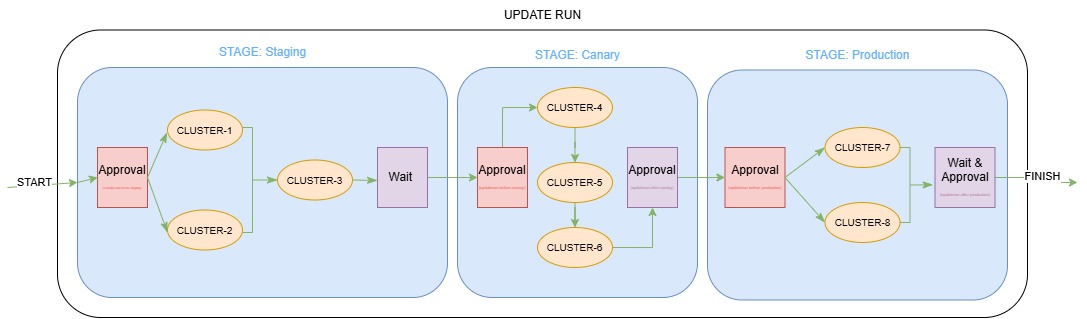
Diagram Example Configuration
apiVersion: placement.kubernetes-fleet.io/v1beta1
kind: ClusterStagedUpdateStrategy
metadata:
  name: production-rollout
spec:
  stages:
    - name: staging
      labelSelector:
        matchLabels:
          environment: staging
      maxConcurrency: 75%
      beforeStageTasks:
        - type: Approval
      afterStageTasks:
        - type: TimedWait
          waitTime: 1h
    - name: canary
      labelSelector:
        matchLabels:
          environment: canary
      # Default MaxConcurrency (1)
      beforeStageTasks:
        - type: Approval
      afterStageTasks:
        - type: Approval
    - name: production
      labelSelector:
        matchLabels:
          environment: production
      maxConcurrency: 2
      beforeStageTasks:
        - type: Approval
      afterStageTasks:
        - type: TimedWait
          waitTime: 1h
        - type: Approval
Overview
Kubefleet provides staged update capabilities at two scopes to serve different organizational needs:
Cluster-Scoped: ClusterStagedUpdateStrategy, ClusterStagedUpdateRun, and ClusterApprovalRequest for fleet administrators managing infrastructure-level changes across clusters.
Namespace-Scoped: StagedUpdateStrategy, StagedUpdateRun, and ApprovalRequest for application teams managing rollouts within their specific namespaces.
Both systems follow the same pattern:
- Strategy resources define reusable orchestration patterns with stages, ordering, and approval gates
- UpdateRun resources execute the strategy for specific rollouts using a target placement, resource snapshot, and strategy name
- External rollout strategy must be set on the target placement to enable staged updates
Key Differences by Persona
| Aspect | Fleet Administrators (Cluster-Scoped) | Application Teams (Namespace-Scoped) |
|---|---|---|
| Scope | Entire clusters and infrastructure | Individual applications within namespaces |
| Resources | ClusterStagedUpdateStrategy, ClusterStagedUpdateRun, ClusterApprovalRequest | StagedUpdateStrategy, StagedUpdateRun, ApprovalRequest |
| Target | ClusterResourcePlacement | ResourcePlacement (namespace-scoped) |
| Use Cases | Fleet-wide updates, infrastructure changes | Application rollouts, service updates |
| Permission | Requires cluster-admin permissions | Operates within namespace boundaries |
Configure External Rollout Strategy
Both placement types require setting the rollout strategy to External to enable staged updates:
Cluster-scoped example:
apiVersion: placement.kubernetes-fleet.io/v1beta1
kind: ClusterResourcePlacement
metadata:
  name: example-placement
spec:
  resourceSelectors:
    - group: ""
      kind: Namespace
      name: test-namespace
      version: v1
  policy:
    placementType: PickAll
  strategy:
    type: External # enables staged updates
Namespace-scoped example:
apiVersion: placement.kubernetes-fleet.io/v1beta1
kind: ResourcePlacement
metadata:
  name: example-namespace-placement
  namespace: my-app-namespace
spec:
  resourceSelectors:
    - group: "apps"
      kind: Deployment
      name: my-application
      version: v1
  policy:
    placementType: PickAll
  strategy:
    type: External # enables staged updates
Define Staged Update Strategies
Staged update strategies define reusable orchestration patterns that organize target clusters into stages with specific rollout sequences and approval gates. Both scopes use similar configurations but operate at different levels.
Cluster-Scoped Strategy
ClusterStagedUpdateStrategy organizes member clusters into stages:
apiVersion: placement.kubernetes-fleet.io/v1beta1
kind: ClusterStagedUpdateStrategy
metadata:
  name: cluster-config-strategy
spec:
  stages:
    - name: staging
      labelSelector:
        matchLabels:
          environment: staging
      maxConcurrency: 2  # Update 2 clusters concurrently
      afterStageTasks:
        - type: TimedWait
          waitTime: 1h
    - name: canary
      labelSelector:
        matchLabels:
          environment: canary
      maxConcurrency: 1  # Sequential updates (default)
      beforeStageTasks:
        - type: Approval  # Require approval before starting canary stage
      afterStageTasks:
        - type: Approval
    - name: production
      labelSelector:
        matchLabels:
          environment: production
      sortingLabelKey: order
      maxConcurrency: 50%  # Update 50% of production clusters at once
      afterStageTasks:
        - type: Approval
        - type: TimedWait
          waitTime: 1h
Namespace-Scoped Strategy
StagedUpdateStrategy follows the same pattern but operates within namespace boundaries:
apiVersion: placement.kubernetes-fleet.io/v1beta1
kind: StagedUpdateStrategy
metadata:
  name: app-rollout-strategy
  namespace: my-app-namespace
spec:
  stages:
    - name: dev
      labelSelector:
        matchLabels:
          environment: development
      maxConcurrency: 3  # Update 3 dev clusters at once
      afterStageTasks:
        - type: TimedWait
          waitTime: 30m
    - name: prod
      labelSelector:
        matchLabels:
          environment: production
      sortingLabelKey: deployment-order
      maxConcurrency: 1  # Sequential production updates
      afterStageTasks:
        - type: Approval
Stage Configuration
Each stage includes:
- name: Unique identifier for the stage
- labelSelector: Selects target clusters for this stage
- sortingLabelKey (optional): Label whose integer value determines update sequence within the stage
- maxConcurrency (optional): Maximum number of clusters to update concurrently within the stage. Can be an absolute number (e.g.,
5) or percentage (e.g.,50%). Defaults to1(sequential). Fractional results are rounded down with a minimum of 1 - beforeStageTasks (optional): Tasks that must complete before starting the stage (max 1 task, Approval type only)
- afterStageTasks (optional): Tasks that must complete before proceeding to the next stage (max 2 tasks, Approval and/or TimedWait type)
Stage Tasks
Stage tasks provide control gates at different points in the rollout lifecycle:
Before-Stage Tasks
Execute before a stage begins. Only one task allowed per stage. Supported types:
- Approval: Requires manual approval before starting the stage
For before-stage approval tasks, the system creates an approval request named <updateRun-name>-before-<stage-name>.
After-Stage Tasks
Execute after all clusters in a stage complete. Up to two tasks allowed (one of each type). Supported types:
- TimedWait: Waits for a specified duration before proceeding to the next stage
- Approval: Requires manual approval before proceeding to the next stage
For after-stage approval tasks, the system creates an approval request named <updateRun-name>-after-<stage-name>.
Approval Request Details
For all approval tasks, the approval request type depends on the scope:
- Cluster-scoped: Creates
ClusterApprovalRequest(short name:careq) - a cluster-scoped resource containing a spec withparentStageRollout(the UpdateRun name) andtargetStage(the stage name). The spec is immutable after creation. - Namespace-scoped: Creates
ApprovalRequest(short name:areq) within the same namespace - a namespace-scoped resource with the same spec structure asClusterApprovalRequest.
Both approval request types use status conditions to track approval state:
Approvedcondition (statusTrue): indicates the request was approved by a userApprovalAcceptedcondition (statusTrue): indicates the approval was processed and accepted by the system
Approve manually by setting the Approved condition to True using kubectl patch:
Note: Observed generation in the Approved condition should match the generation of the approvalRequest object.
# For cluster-scoped before-stage approvals
kubectl patch clusterapprovalrequests example-run-before-canary --type='merge' \
  -p '{"status":{"conditions":[{"type":"Approved","status":"True","reason":"approved","message":"approved","lastTransitionTime":"'$(date -u +"%Y-%m-%dT%H:%M:%SZ")'","observedGeneration":1}]}}' \
  --subresource=status

# For cluster-scoped after-stage approvals
kubectl patch clusterapprovalrequests example-run-after-canary --type='merge' \
  -p '{"status":{"conditions":[{"type":"Approved","status":"True","reason":"approved","message":"approved","lastTransitionTime":"'$(date -u +"%Y-%m-%dT%H:%M:%SZ")'","observedGeneration":1}]}}' \
  --subresource=status

# For namespace-scoped approvals
kubectl patch approvalrequests example-run-before-canary -n test-namespace --type='merge' \
  -p '{"status":{"conditions":[{"type":"Approved","status":"True","reason":"approved","message":"approved","lastTransitionTime":"'$(date -u +"%Y-%m-%dT%H:%M:%SZ")'","observedGeneration":1}]}}' \
  --subresource=status
Trigger Staged Rollouts
UpdateRun resources execute strategies for specific rollouts. Both scopes follow the same pattern:
Cluster-scoped example:
apiVersion: placement.kubernetes-fleet.io/v1beta1
kind: ClusterStagedUpdateRun
metadata:
  name: example-run
spec:
  placementName: example-placement              # Required: Name of Target ClusterResourcePlacement
  resourceSnapshotIndex: "0"                    # Optional: Resource version (omit to use the latest snapshot, creating one if it does not already exist)
  stagedRolloutStrategyName: example-strategy   # Required: Name of the strategy to execute
  state: Run                                    # Optional: Initialize (default), Run, or Stop
Namespace-scoped example:
apiVersion: placement.kubernetes-fleet.io/v1beta1
kind: StagedUpdateRun
metadata:
  name: app-rollout-v1-2-3
  namespace: my-app-namespace
spec:
  placementName: example-namespace-placement      # Required: Name of target ResourcePlacement. The StagedUpdateRun must be created in the same namespace as the ResourcePlacement
  resourceSnapshotIndex: "5"                      # Optional: Resource version (omit to use the latest snapshot, creating one if it does not already exist)
  stagedRolloutStrategyName: app-rollout-strategy # Required: Name of the strategy to execute. Must be in the same namespace
  state: Initialize                               # Optional: Initialize (default), Run, or Stop
Creating Latest Resource Snapshot:
apiVersion: placement.kubernetes-fleet.io/v1beta1
kind: ClusterStagedUpdateRun
metadata:
  name: example-run-latest
spec:
  placementName: example-placement
  # resourceSnapshotIndex omitted - system uses the latest snapshot (creates one if it does not already exist)
  stagedRolloutStrategyName: example-strategy
  state: Run
UpdateRun State Management
UpdateRuns support three states to control execution lifecycle:
| State | Behavior | Use Case |
|---|---|---|
| Initialize | Prepares the updateRun without executing (default) | Review computed stages before starting rollout |
| Run | Executes the rollout or resumes from stopped state | Start or resume the staged rollout |
| Stop | Pauses execution at current cluster/stage | Temporarily halt rollout for investigation |
Valid State Transitions:
Initialize→Run: Start the rolloutRun→Stop: Pause the rolloutStop→Run: Resume the rollout
Invalid State Transitions:
Initialize→Stop: Cannot stop before startingRun→Initialize: Cannot reinitialize after startingStop→Initialize: Cannot reinitialize after stopping
The state field is the only mutable field in the UpdateRunSpec. You can update it to control rollout execution:
# Start a rollout
kubectl patch csur example-run --type='merge' -p '{"spec":{"state":"Run"}}'

# Pause a rollout
kubectl patch csur example-run --type='merge' -p '{"spec":{"state":"Stop"}}'

# Resume a paused rollout
kubectl patch csur example-run --type='merge' -p '{"spec":{"state":"Run"}}'
UpdateRun Execution
UpdateRuns execute in three phases:
- Initialization: Validates placement, captures latest strategy snapshot, collects target bindings, generates cluster update sequence, uses the specified resource snapshot or the latest snapshot (creating one if it does not already exist) if unspecified & records override snapshots. Occurs once on creation when state is
Initialize,RunorStop. - Execution: Processes stages sequentially, updates clusters within each stage (respecting maxConcurrency), enforces before-stage and after-stage tasks. Only occurs when state is
Run - Stopping/Stopped When state is
Stop, the updateRun pauses execution at the current cluster/stage and can be resumed by changing state back toRun. If there are updating/deleting clusters we wait after marking updateRun asStoppingfor the in-progress clusters to reach a deterministic state: succeeded, failed or stuck before marking updateRun asStopped
Important Constraints and Validation
Immutable Fields: Once created, the following UpdateRun spec fields cannot be modified:
placementName: Target placement resource nameresourceSnapshotIndex: Resource version to deploy (empty string if omitted)stagedRolloutStrategyName: Strategy to execute
Mutable Field: The state field can be modified after creation to control execution (Initialize, Run, Stop).
Strategy Limits: Each strategy can define a maximum of 31 stages to ensure reasonable execution times.
MaxConcurrency Validation:
- Must be >= 1 for absolute numbers
- Must be 1-100% for percentages
- Fractional results are rounded down with minimum of 1
Monitor UpdateRun Status
UpdateRun status provides detailed information about rollout progress across stages and clusters. The status includes:
- Overall conditions: Initialization, progression, and completion status
- Stage status: Progress and timing for each stage
- Cluster status: Individual cluster update results with maxConcurrency respected
- Before-stage task status: Pre-stage approval progress
- After-stage task status: Post-stage approval and wait task progress
- Resource snapshot used: The actual resource snapshot index used (from spec or latest)
- Policy snapshot used: The policy snapshot index used during initialization
Use kubectl describe to view detailed status:
# Cluster-scoped (can use short name 'csur')
kubectl describe clusterstagedupdaterun example-run
kubectl describe csur example-run

# Namespace-scoped (can use short name 'sur')
kubectl describe stagedupdaterun app-rollout-v1-2-3 -n my-app-namespace
kubectl describe sur app-rollout-v1-2-3 -n my-app-namespace
UpdateRun and Placement Relationship
UpdateRuns and Placements work together to orchestrate rollouts, with each serving a distinct purpose:
The Trigger Mechanism
UpdateRuns serve as the trigger that initiates rollouts for their respective placement resources:
- Cluster-scoped:
ClusterStagedUpdateRuntriggersClusterResourcePlacement - Namespace-scoped:
StagedUpdateRuntriggersResourcePlacement
Before an UpdateRun is Created
When you create a Placement with spec.strategy.type: External, the system schedules which clusters should receive the resources, but does not deploy anything yet. The Placement remains in a scheduled but not available state, waiting for an UpdateRun to trigger the actual rollout.
Note: Resource snapshots are not automatically created for placements with
spec.strategy.type: External. If you create a new placement directly withExternalstrategy, you must omit theresourceSnapshotIndexfield in your UpdateRun spec to have the system create a new snapshot during initialization.
After an UpdateRun is Created
Once you create an UpdateRun, the system begins executing the staged rollout. Both resources provide status information, but at different levels of detail:
UpdateRun Status - High-level rollout orchestration:
- Which stage is currently executing
- Which clusters have started/completed updates
- Whether after-stage tasks (approvals, waits) are complete
- Overall rollout progression through stages
Placement Status - Detailed deployment information for each cluster:
- Success or failure of individual resource creation (e.g., did the Deployment create successfully?)
- Whether overrides were applied correctly
- Specific error messages if resources failed to deploy
- Detailed conditions for troubleshooting
This separation of concerns allows you to:
- Monitor high-level rollout progress and stage execution through the UpdateRun
- Drill down into specific deployment issues on individual clusters through the Placement
- Understand whether a problem is with the staged rollout orchestration or with resource deployment itself
Concurrent UpdateRuns
Multiple UpdateRuns can execute concurrently for the same placement with one constraint: all concurrent runs must use identical strategy configurations to ensure consistent behavior.
Next Steps
- Learn how to rollout and rollback CRP resources with Staged Update Run
- Learn how to troubleshoot a Staged Update Run
11 - Eviction and Placement Disruption Budget
Concept about Eviction and Placement Disrupiton Budget
This document explains the concept of Eviction and Placement Disruption Budget in the context of the fleet.
Overview
Eviction provides a way to force remove resources from a target cluster once the resources have already been propagated from the hub cluster by a Placement object.
Eviction is considered as an voluntary disruption triggered by the user. Eviction alone doesn’t guarantee that resources won’t be propagated to target cluster again by the scheduler.
The users need to use taints in conjunction with Eviction to prevent the scheduler from picking the target cluster again.
The Placement Disruption Budget object protects against voluntary disruptions.
The only voluntary disruption that can occur in the fleet is the eviction of resources from a target cluster which can be achieved by creating the ClusterResourcePlacementEviction object.
Some cases of involuntary disruptions in the context of fleet,
- The removal of resources from a member cluster by the scheduler due to scheduling policy changes.
- Users manually deleting workload resources running on a member cluster.
- Users manually deleting the
ClusterResourceBindingobject which is an internal resource the represents the placement of resources on a member cluster. - Workloads failing to run properly on a member cluster due to misconfiguration or cluster related issues.
For all the cases of involuntary disruptions described above, the Placement Disruption Budget object does not protect against them.
ClusterResourcePlacementEviction
An eviction object is used to remove resources from a member cluster once the resources have already been propagated from the hub cluster.
The eviction object is only reconciled once after which it reaches a terminal state. Below is the list of terminal states for ClusterResourcePlacementEviction,
ClusterResourcePlacementEvictionis valid and it’s executed successfully.ClusterResourcePlacementEvictionis invalid.ClusterResourcePlacementEvictionis valid but it’s not executed.
To successfully evict resources from a cluster, the user needs to specify:
- The name of the
ClusterResourcePlacementobject which propagated resources to the target cluster. - The name of the target cluster from which we need to evict resources.
When specifying the ClusterResourcePlacement object in the eviction’s spec, the user needs to consider the following cases:
- For
PickFixedCRP, eviction is not allowed; it is recommended that one directly edit the list of target clusters on the CRP object. - For
PickAll&PickNCRPs, eviction is allowed because the users cannot deterministically pick or unpick a cluster based on the placement strategy; it’s up to the scheduler.
Note: After an eviction is executed, there is no guarantee that the cluster won’t be picked again by the scheduler to propagate resources for a
ClusterResourcePlacementresource. The user needs to specify a taint on the cluster to prevent the scheduler from picking the cluster again. This is especially true forPickAll ClusterResourcePlacementbecause the scheduler will try to propagate resources to all the clusters in the fleet.
ClusterResourcePlacementDisruptionBudget
The ClusterResourcePlacementDisruptionBudget is used to protect resources propagated by a ClusterResourcePlacement to a target cluster from voluntary disruption, i.e., ClusterResourcePlacementEviction.
Note: When specifying a
ClusterResourcePlacementDisruptionBudget, the name should be the same as theClusterResourcePlacementthat it’s trying to protect.
Users are allowed to specify one of two fields in the ClusterResourcePlacementDisruptionBudget spec since they are mutually exclusive:
- MaxUnavailable - specifies the maximum number of clusters in which a placement can be unavailable due to any form of disruptions.
- MinAvailable - specifies the minimum number of clusters in which placements are available despite any form of disruptions.
for both MaxUnavailable and MinAvailable, the user can specify the number of clusters as an integer or as a percentage of the total number of clusters in the fleet.
Note: For both MaxUnavailable and MinAvailable, involuntary disruptions are not subject to the disruption budget but will still count against it.
When specifying a disruption budget for a particular ClusterResourcePlacement, the user needs to consider the following cases:
| CRP type | MinAvailable DB with an integer | MinAvailable DB with a percentage | MaxUnavailable DB with an integer | MaxUnavailable DB with a percentage |
|---|---|---|---|---|
PickFixed | ❌ | ❌ | ❌ | ❌ |
PickAll | ✅ | ❌ | ❌ | ❌ |
PickN | ✅ | ✅ | ✅ | ✅ |
Note: We don’t allow eviction for
PickFixedCRP and hence specifying aClusterResourcePlacementDisruptionBudgetforPickFixedCRP does nothing. And forPickAllCRP, the user can only specifyMinAvailablebecause total number of clusters selected by aPickAllCRP is non-deterministic. If the user creates an invalidClusterResourcePlacementDisruptionBudgetobject, when an eviction is created, the eviction won’t be successfully executed.