This is the multi-page printable view of this section. Click here to print.
2026 Posts
KubeFleet Performance and Scalability Report - Q1 2026
This document provides a report on the performance and scalability of the KubeFleet project as of early 2026, specifically highlighting how well KubeFleet can support a fleet at scale. It is a part of the efforts to continuously evolve KubeFleet's architecture, design, and implementation to meet the needs of multi-cluster management at a larger scale, with the goal of ensuring a smooth and efficient experience in a fleet of 1,000 member clusters + 1,000 placements + 100 concurrent progressive rollouts.
TL;DR
- With proper confirmation, you can use KubeFleet to manage a large-scale multi-cluster enviornment environment with up to 1,000 member clusters, 1,000 placements, and 100 concurrent progressive rollouts.
- To support deployments at such a scale,
- on your KubeFleet hub cluster:
- make sure that the API server and its etcd storage backend are configured to handle higher volume
of requests. In this evaluation, we see that:
- the API server may take 10+ cores of CPU and 30+ GB of memory when KubeFleet is busy processing a large number of placements and progressive rollouts concurrently;
- the KubeFleet API objects in total consume approximately 2 GB of space on the etcd storage backend.
- make sure that the KubeFleet hub agent is allocated with ample CPU and memory resources:
- the agent needs 8-12 cores and 16-24 GB of memory to run smoothly in a large-scale multi-cluster environment.
- make sure that the API server and its etcd storage backend are configured to handle higher volume
of requests. In this evaluation, we see that:
- the KubeFleet member agent can run reasonably well with a much smaller resource allocation (e.g., 1 core and 2 GB of memory).
- on your KubeFleet hub cluster:
- KubeFleet can reliably process placements and progressive rollouts fast in a larger-scale environment:
- Typically a placement that picks 100 member clusters in a fleet of 1,000 clusters using a label selector can be processed within 30 seconds.
- A 3-staged, non-gated progressive rollout with 50% in-stage concurrency can be completed within 2 minutes. Running 100 of such rollouts concurrently usually takes less than 4 minutes to complete.
- As with any Kubernetes controllers, the KubeFleet agents, especially the hub agent, need to re-sync resources periodically or when they restart. In a larger-scale environment with many (1,000) placements, the re-processing should take less than 15 minutes to complete. During this period, you might experience some level of degraded responsiveness in the system.
- We are committed to continuously optimizing KubeFleet’s performance and scalability; this report is the result of one of the many rounds of evaluations we plan to conduct as KubeFleet continues to evolve. The team aims to support larger-scale deployments better, with faster processing of placements and rollouts, and less resource consumption on both the API server end and the KubeFleet agent end. The team is currently working to revamp how KubeFleet handles heartbeat signals and cluster property collection for a smoother experience. Please reach out to us if you have any concerns or suggestions in the domain of KubeFleet performance and scalability.
A side note
Your experience with KubeFleet may vary due to a variety of factors, such as:
- the placement patterns in use (such as the size of resources to place, the complexity of scheduling policies, etc.);
- the distribution of resources across member clusters;
- the network connectivity between member clusters and the hub cluster;
- the configuration of your KubeFleet agents (such as the heartbeat interval, the cluster property provider in use, the features enabled, etc.);
- the configuration of your KubeFleet hub cluster (such as the CPU/memory resources allocated to the API server and its storage backend, the space available in the storage backend, etc.).
If you encounter a situation where KubeFleet is not performing up to your expectations, please feel free to reach out to us via our community channels; we are more than happy to gain a better understanding of the scenario and work towards a solution if possible.
Background
As cloud-native computing continues to evolve both in scale and complexity, challenges around management of a large-scale resource pool for containerized workloads across multiple platforms and multiple regions have become increasingly prominent for many organizations. The exponential growth of AI-driven/AI-enhanced workloads has further accelerated this need for a solution that enables robust distributed computing.
As an attempt to address these challenges and to provide developers with an approach that allows simplified management of containers in a distributed environment, we began the development of the KubeFleet project in late 2022. The project aims to explore architectures, designs, and implementations that allow organizations to manage their Kubernetes clusters through one single plane, simplify the experience of running workloads in a distributed manner with an easy-to-use abstraction layer and a flexible API.
KubeFleet became a CNCF sandbox project in 2025. Since then we have been seeing that many teams have started to experiment with KubeFleet, and evaluated it for production use on a larger scale. To help developers and operators better understand KubeFleet’s performance and scalability, and to document the best practices when running KubeFleet at scale, we periodically conduct performance and scalability tests on KubeFleet builds, and use the results to guide our development and optimization efforts in future iterations. This document summarizes the results of such evaluations in early 2026.
About the KubeFleet project: its architecture and major features/APIs
As briefly introduced above, KubeFleet is a project that enables management of multiple Kubernetes clusters with ease. It features a hub-spoke architecture; a KubeFleet deployment (a fleet) consists of:
- A hub cluster: this is a Kubernetes cluster that runs the KubeFleet hub agent; it serves as the control plane of the fleet, which allows users to place Kubernetes resources across the fleet, roll out resource changes progressively, and monitor the status of all member clusters.
- Multiple member clusters: each member cluster runs an instance of the KubeFleet member agent; this agent connects to the hub cluster and pulls resource manifests for placement, and reports back the status of the cluster along with all the placed resources. Typically user workloads run only on the member clusters.
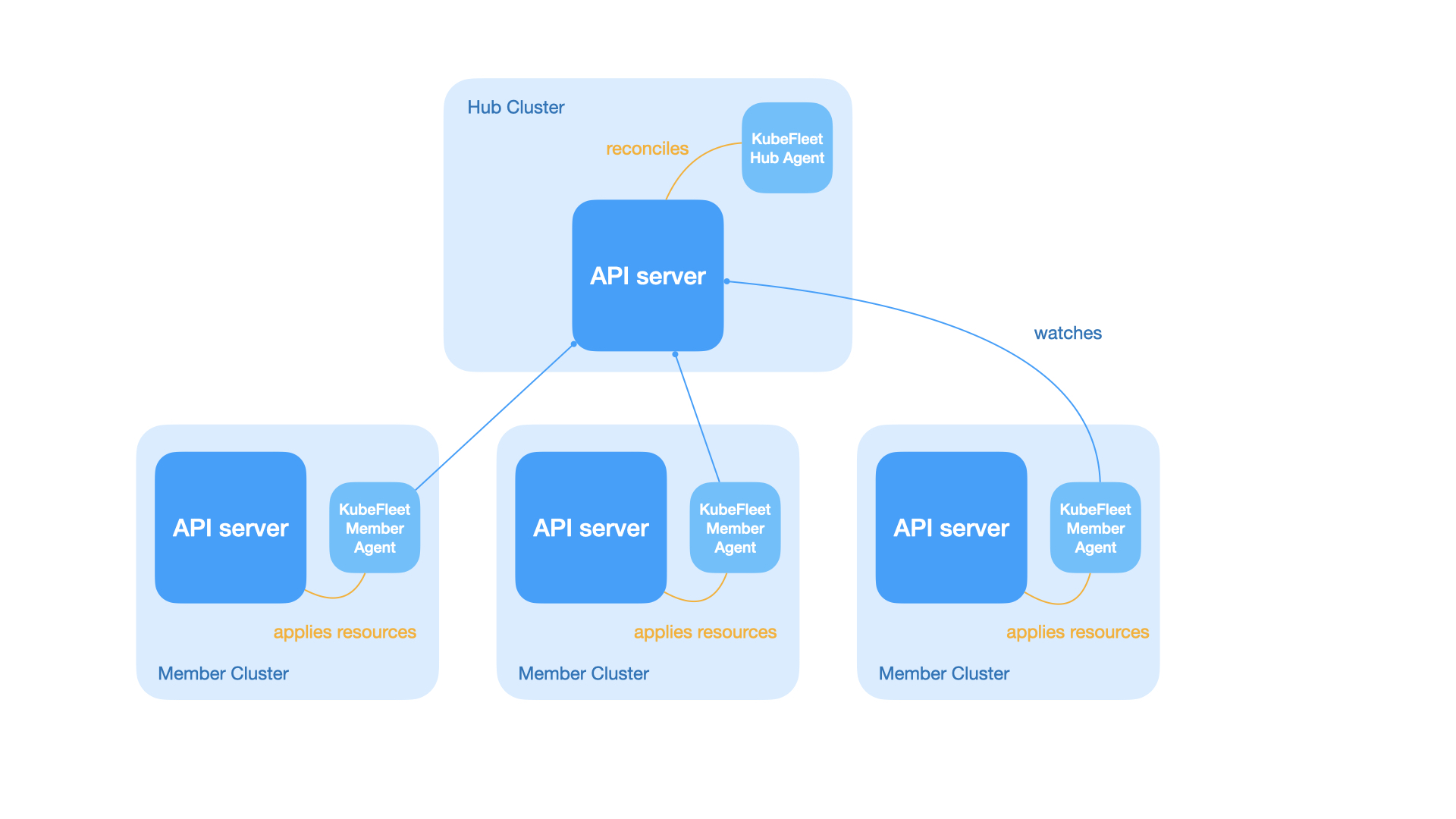
KubeFleet primarily provides the following APIs for users to orchestrate their multi-cluster workloads and monitor their member clusters:
- The placement APIs: users can make use of the
ClusterResourcePlacementandResourcePlacementAPIs (for cluster-scoped and namespace-scoped resources respectively) to place arbitrary Kubernetes resources across the fleet. These APIs allow users to pick member clusters with a scheduling policy; the KubeFleet workload scheduler can then determine the targets for resource placement dynamically based on the policy. - The progressive rollout APIs: once a set of resources are placed, users can initiate
a progressive (staged) rollout of resource changes across all picked member clusters with KubeFleet’s
StagedUpdateStrategyandStagedUpdateRunAPIs. Users may group member clusters into different stages (e.g.,staging,canary,prod), and roll out changes one stage at a time with a specific plan. The APIs also provide users with options to manually approve a rollout stage, or set up a cooldown period between stages, for improved control and safety. - The cluster management APIs: the
MemberClusterAPI helps users manage their member clusters in the fleet, and provides a way to monitor its status. With a cluster property provider configured, KubeFleet can collect and refresh information about a member cluster, such as its capacity, resource availability, and costs, automatically; such information can also be used to inform the scheduling decisions for resource placements.
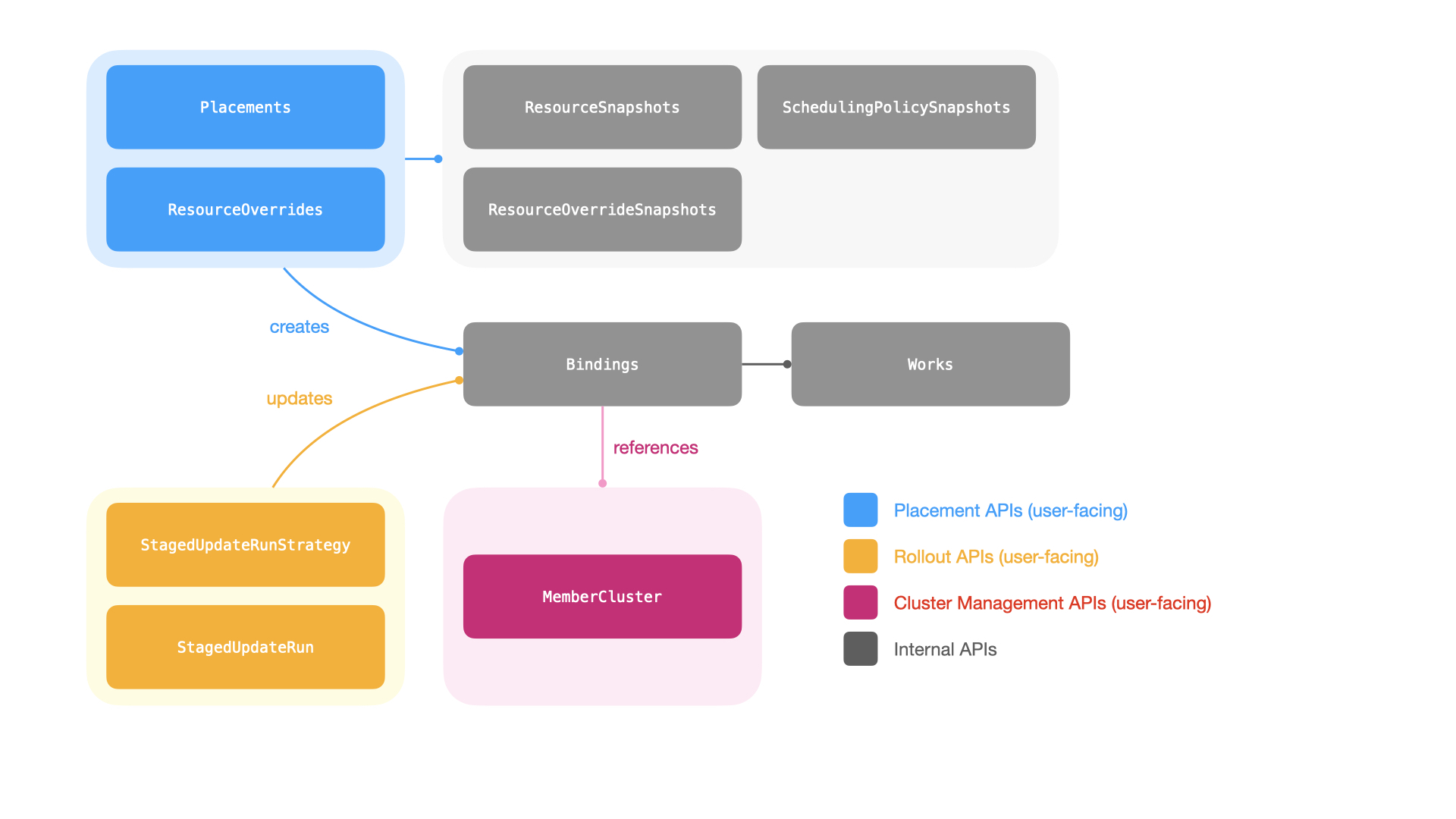
With the current architecture and the feature set, the following factors might be in play when evaluating KubeFleet’s performance and scalability:
The number of member clusters: each KubeFleet member agent instance is configured to send heartbeats periodically (typically every 15-120 seconds; the value is user configurable) to the hub cluster side via the cluster management APIs, to report the status of the host member cluster, and to report refreshed cluster properties (if applicable). And each heartbeat signal is a write to the hub cluster API server; as the number of member clusters climbs, the hub cluster API server (and its
etcdstorage backend) will need to handle the resulting higher write throughput, which may lead to additional resource usage overhead and increased latencies.The number of placements and the number of picked target member clusters for each placement: when KubeFleet processes a resource placement, for each picked target member cluster, the KubeFleet hub agent will need to create a
Bindingobject and one or moreWorkobjects (depending on the size of the resource manifests). In a large fleet with many placements that each pick a high number of target member clusters, there might be a very significant number ofBindingandWorkobjects present; they may take a considerable amount of the storage space in the hub cluster’setcdstorage backend, and the hub cluster API server must be prepared to handle the read/write throughput for such objects as the KubeFleet hub agent continuously processes the placements.The number of concurrently running progressive rollouts: when a placement is set up for a progressive rollout, the KubeFleet hub agent will scan all picked target member clusters, manipulate related placement API objects as necessary, and monitor the health status of placed resources as the rollout is in progress. This is a process that will repeat continuously until the rollout is completed, and it may incur a considerable number of reads/writes on the hub cluster API server end and the storage backend, especially when the number of concurrently running rollouts is high, and when each placement to roll out picks a high number of target member clusters. This might also add latencies to other KubeFleet functionalities (such as the processing of new placements) under adverse conditions.
Our performance and scalability goals
At this moment, the KubeFleet team targets a performance/scalability goal of enabling a smooth and responsive experience in a fleet with
- up to 1,000 member clusters; and
- up to 1,000 placements, each of which picks 100 member clusters (10% of the fleet); and
- up to 100 concurrently running progressive rollouts.
We focus not only on the possibility that KubeFleet can support usage at such a scale, but also on the aspect that under this scale, KubeFleet can still complete placement and rollout operations within a reasonable amount of time. We pay additional attention to ensuring that this is a sustainable amount of load for KubeFleet: to be more specific, as elaborated in later sections, users should not see any issue at this scale when they restart the KubeFleet hub agent (e.g., for upgrades), or when the agent re-syncs (re-processes) all the resources for correctness checks. Naturally, to support larger fleets, the hub cluster API server, its storage backend, and the KubeFleet agents themselves will manifest a higher resource usage level; we would also make sure that such a usage level is still within a reasonable range, so that users can run large-scale KubeFleet deployments without having to worry about excessive costs.
Our optimization is an on-going effort. As we continue to tweak KubeFleet’s architecture, design, and implementation, and add more features, you might see different performance profiles across different KubeFleet builds. We will periodically re-run the performance and scalability evaluation and publish the latest results on our documentation site, to help adopters keep track of our progress in the domain of performance and scalability; we might also tune our goals as we understand better the needs and expectations of the community.
It is also worth noting again that your actual experience may vary depending on your specific use cases and environment setup. There are many factors that can have an impact on KubeFleet’s performance and scalability, as mentioned at the beginning of the document. We will try our best to cover scenarios that are representative of common KubeFleet use cases in our evaluation, however, it is not our intention to present this document as a guarantee that the target scale can be met under all circumstances. If you encounter a situation where KubeFleet is not performing up to your expectations, please feel free to reach out to us via our community channels; we are more than happy to learn about the scenario and work towards a solution if possible.
Target Service Levels
With the target scale in mind, we define the following Service Level Indicators = (SLIs) and Service Level Objectives (SLOs) for larger-scale KubeFleet deployments:
A side note
Unless otherwise specified, the evaluation assumes that a placement will:
- pick 100 member clusters with a label selector;
- select a
namespacewith aconfigMapof 1 KB data and adeploymentwith a replica count of 0.
And it assumes that a staged progressive rollout will:
- have 3 stages (with 20, 30, and 50 clusters in each stage respectively);
- have a 50% in-stage concurrency; and
- have no gates (timed wait or manual approval) between stages.
For more details about the placement and rollout configuration, see the Methodology section below.
Cluster management
| SLI | SLO |
|---|---|
| The p90 queueing delay of heartbeat signal processing | Less than 1 sec |
Placement
| SLI | SLO |
|---|---|
| The p90 latency of completing a new placement across 10 attempts | Less than 30 sec |
| SLI | SLO |
|---|---|
| The p90 latency of completing a new placement across 10 attempts | Less than 30 sec |
| The p90 latency of completing a resync of all placements across 10 attempts | Less than 15 min |
| SLI | SLO |
|---|---|
| The p90 latency of completing a new placement across 10 attempts | Less than 60 sec |
Progressive rollout
| SLI | SLO |
|---|---|
| The p90 latency of completing a new staged progressive rollout across 10 attempts | Less than 2 minutes |
| The p90 latency of completing 100 new staged progressive rollouts in parallel | Less than 4 minutes |
Resource usage
Hub cluster etcd storage backend
| SLI | SLO |
|---|---|
| Storage space usage | Nominal (<200 MB) |
| SLI | SLO |
|---|---|
| Storage space usage | < 3 GB |
Hub agent
| SLI | SLO |
|---|---|
| CPU and memory resource usage (p90) | Nominal (<1 core, <512 MB) |
| SLI | SLO |
|---|---|
| CPU and memory resource usage (p90) when the agent restarts/re-syncs | < 6 cores and <16 GB |
| SLI | SLO |
|---|---|
| CPU and memory resource usage (p90) | < 6 cores and <16 GB |
Member agent
| SLI | SLO |
|---|---|
| CPU and memory resource usage (p90) | Nominal (<0.5 cores, <128 MB) |
| SLI | SLO |
|---|---|
| CPU and memory resource usage (p90) when the agent restarts/re-syncs | Nominal (<1 core, <512 MB) |
| SLI | SLO |
|---|---|
| CPU and memory resource usage (p90) | Nominal (<1 core, <512 MB) |
Methodology
The evaluation environment setup
This round of KubeFleet performance/scalability evaluation uses the KubeFleet build at commit
382c2c (Link on GitHub, committed on Apr 1, 2026).
The evaluation environment uses a standard-tier AKS cluster as the hub cluster. The cluster is created
in the Azure westus2 region, and has one node pool of 2 Standard_D16s_v3 nodes (16 vCPUs and 64 GB memory each).
It runs Kubernetes v1.34.4, and has the following AKS features enabled:
- Microsoft Entra integration for Kubernetes authentication and authorization
- Azure CNI node subnet networking
The hub cluster manages 1,000 member clusters. Each member cluster is a virtual Kubernetes cluster
created using the vCluster project, version 0.32.1. The member clusters
are configured to also run Kubernetes v1.34.4. The 1,000 member clusters are evenly spread across
20 host clusters (50 virtual member clusters per host cluster); the host clusters are created
in the same Azure region as the hub cluster (westus2), and each of them has one node pool of 4
Standard_D16s_v3 nodes (16 vCPUs and 64 GB memory each). The host clusters are also
standard-tier AKS clusters with the same set of features enabled as the hub cluster. The hub cluster and all the
host clusters reside on separate Azure virtual networks; the KubeFleet member agents connect to the
hub cluster API server via its public endpoint. We anticipate that the network latency between
the hub cluster and the host clusters is of low single-digit milliseconds (network latencies in the same
Azure region over Azure’s backbone network are typically around 1-2 milliseconds).
For the KubeFleet hub agent, it was deployed with the following configuration:
- its CPU/memory resource requests are set to 1 core and 1 GB respectively
- its CPU/memory resource limits are set to 12 cores and 24 GB respectively
- it has the validation webhooks enabled
If a specific setting is not mentioned here in the list, it uses the default value as specified in the KubeFleet hub agent Helm chart.
As for the KubeFleet member agents, they were deployed with the following configuration:
- their CPU/memory resource requests are set to 0.1 core and 128 MB respectively
- their CPU/memory resource limits are set to 1 core and 2 GB respectively
- they have the Azure cluster property provider enabled
- they have priority-based queueing enabled
If a specific setting is not mentioned here in the list, it uses the default value as specified in the KubeFleet member agent Helm chart.
This evaluation environment configures each member cluster to send a heartbeat every 60 seconds.
The evaluation steps
The performance/scalability evaluation process consists of the following steps:
- Set up the hub cluster and the member clusters as specified above.
- Collect the hub cluster API server’s resource usage data (CPU and memory), and the etcd storage backend’s space usage; this helps establish a baseline for the resource usage levels.
- Join the 1,000 member clusters into the fleet.
- Each member cluster is assigned with a unique index, from 1 to 1,000.
- For a member cluster of index
i, it is labeled with a resource groupresource-group=i%10. - A member cluster is also assigned with an environment label:
- Member clusters with index between
[1, 200]are labeled withenv=staging; - Member clusters with index between
[201, 500]are labeled withenv=canary; - Member clusters with index between
[501, 1,000]are labeled withenv=prod.
- Member clusters with index between
- After the joining completes successfully, collect the following data:
- The hub cluster API server’s resource usage data (CPU and memory), and etcd storage backend’s space usage;
- The p90 queueing delay of heartbeat signal processing on the KubeFleet hub agent side;
- The KubeFleet hub agent’s resource usage data (CPU and memory);
- The KubeFleet member agents’ resource usage data (CPU and memory), as sampled from 10 randomly selected instances.
- Create 1 placement that picks 100 member clusters using a scheduling policy with a label
selector of
resource-group=N. The placement is set to select a namespace, and a config map of 1 KB data + a deployment that runs the Kubernetespauseimage with a replica count of 0. Repeat this step for 10 times withNset to0-9respectively.- Collect the p90 latency of placement processing across the 10 attempts.
- Create 1,000 placements that each picks 100 member clusters. Each placement is assigned with an
index
ifrom 1 to 1,000, and it features a scheduling policy with a label selector ofresource-group=N, whereN=i%10. Similar to the setup above, each placement is set to select a namespace, and a config map of 1 KB data + a deployment that runs the Kubernetespauseimage with a replica count of 0. Wait until all the placements are complete. - Downscale the hub agent replica count to 0, wait until the pod is gracefully
terminated, and then upscale it back to 1; this simulates a restart/re-sync process
of the hub agent. Repeat this step for 10 times.
- Collect the p90 re-syncing completion time after the hub agent restarts.
- Create one additional (1,000 + 1) placement that picks 100 member clusters, with a
scheduling policy with a label selector of
resource-group=N. Once again, the placement is set to select a namespace, and a config map of 1 KB data + a deployment that runs the Kubernetespauseimage with a replica count of 0. Repeat this step for 10 times withNset to0-9respectively.- Collect the p90 latency of placement processing across the 10 attempts.
- Initiate a progressive rollout for a placement of index
N. The rollout uses a strategy that has 3 stages (start with allstagingclusters, thencanaryclusters, and finallyprodclusters), a 50% in-stage concurrency, and no gates (timed wait or manual approval) between stages. Repeat this step for 10 times withNset to0-9respectively.- Collect the p90 latency of rollout processing across the 10 attempts.
- Start 100 progressive rollouts concurrently for placements of index
Nbetween[1, 100]. The rollouts use the same policy as previously described. Wait until all the rollouts are complete.- Collect the p90 latency of rollout processing for the 100 concurrent rollouts.
- While the 100 concurrent rollouts are in progress, create one additional (1,000 + 1) placement
in the same way as previously described. Repeat this step for 10 times.
- Collect the p90 latency of placement processing across the 10 attempts.
- At last, collect the following resource usage data when there are 1,000 member clusters +
1,000 placements + 100 concurrent progressive rollouts in the fleet:
- The hub cluster API server’s resource usage data (CPU and memory);
- The hub cluster etcd storage backend’s space usage;
- The KubeFleet hub agent’s resource usage data (CPU and memory);
- The KubeFleet member agents’ resource usage data (CPU and memory), as sampled from 10 randomly selected instances.
Tools and utilities
The scripts and utility programs used in the evaluation process are checked into the
KubeFleet source repository.
For more information, see the README file in the linked directory.
The metrics collected in the process come from two sources:
- The CPU/memory usage of KubeFleet agents are collected via the kube-prometheus-stack. The stack is configured to scrape data points from the agents’ exposed metrics endpoints. The KubeFleet agents expose the default set of controller runtime metrics in addition to a few metrics specific to KubeFleet’s functionalities.
- The CPU/memory usage of the hub cluster API server, and the space usage of the hub cluster etcd storage backend, are collected via Azure Monitoring tools.
Results and Analysis
Joining 1,000 member clusters into the fleet
As a baseline for comparison, when the hub cluster is first provisioned and idling, the API server shows nominal CPU usage (~0.2 cores) and limited memory usage (~900 MB); on the storage side, around 20 MB of space is used.
As we join the 1,000 member clusters into the fleet (with a heartbeat interval of 60 seconds),
we begin to see limited increases in the hub cluster API server’s resource usage level;
the CPU usage jumps to around 0.65 cores, and the memory usage a bit less than 1.4 GB.
The added KubeFleet cluster management API objects (MemberClusters,
InternalMemberClusters, etc.) take around 100 MB more space in the etcd storage backend.
| Idling | After joining 1,000 member clusters | |
|---|---|---|
| Hub cluster API server CPU usage | 252 millicores | 655 millicores |
| Hub cluster API server memory usage | 871 MB | 1392 MB |
| etcd storage backend usage | 23.4 MB | 119 MB |
As one would expect, processing the heartbeat signals is an easy job for the KubeFleet hub agent; we see almost no queueing delays on the controller end. The hub agent’s CPU usage is less than 100 millicores, and its memory usage a bit more than 200 MB.
| After joining 1,000 member clusters | Expectation (SLO) | |
|---|---|---|
| p90 queueing delay of heartbeat signal processing on the hub agent side | 0.06s | Less than 1s ✔ |
| Hub agent CPU usage | 93 millicores | Less than 1 core ✔ |
| Hub agent memory usage | 234 MB | Less than 512 MB ✔ |
At this point of the evaluation a member agent instance needs to do very little work (just sending the heartbeat signal every 60 seconds), and consequently it consumes barely any CPU and memory resources: the CPU usage is less than 5 millicores, and the memory below 50 MB.
| After joining 1,000 member clusters | Expectation (SLO) | |
|---|---|---|
| Member agent CPU usage | 2.4 millicores | Less than 0.5 core ✔ |
| Member agent memory usage | 32.8 MB | Less than 128 MB ✔ |
Placing resources
The first placement
It takes KubeFleet around 20 seconds (p90) to process a new placement that picks 100 member
clusters in a fleet of 1,000 member clusters, when there are no other placements or rollouts running.
We do see some level of variation across different attempts, with the latencies ranging
between <10 seconds and 22 seconds. The result is reasonable and within our expectations,
as the KubeFleet hub agent needs to filter out clusters and create 100 Binding objects and
100 Work objects in the hub cluster to facilitate the propagation of resources.
| min | p25 | p50 | p75 | p90 | max | Expectation (SLO) |
|---|---|---|---|---|---|---|
| 9s | 12s | 18s | 19s | 20s | 22s | p90 less than 30s ✔ |
The 1,000 placements
We then create 1,000 placements of similar configurations in parallel and wait for their completion. Once they are all done, we profile how well the KubeFleet hub agent can handle the 1,000 placements when the agent restarts/re-syncs. Consistent with the standard Kubernetes controller development practices, to ensure system correctness, the KubeFleet hub agent will re-process all placements in a fleet hub cluster when it restarts, in case a change has been applied during the agent downtime. The agent is also configured to repeat this re-processing step periodically (every 6 hours by default), to ensure that all changes will be captured and processed. This is a cost we have to cover nonetheless, despite the fact that often there will not be any change to process at all.
Re-processing 1,000 placements can be an expensive operation. As briefly discussed earlier,
every time a placement picks a member cluster, the KubeFleet hub agent will spawn a
corresponding Binding object and one or more Work objects to facilitate the propagation
of resources to the said member cluster; in our scenario, 1,000 placements that each picks 100
member clusters will lead to the creation of around 100K Binding objects and 100K Work objects
in the hub cluster. Re-processing them not only takes time, but also comes with a side
effect: when the KubeFleet hub agent is busy re-processing existing placement API objects,
newly created placements will be stuck waiting in the queue, and consequently on the user
end one might experience a period of unresponsiveness when placing resources. The faster
we can complete the re-processing, the shorter such a period of unresponsiveness will be.
In the current build, it can take a bit more than 10 minutes for the re-processing of 1,000 placements to complete:
| min | p25 | p50 | p75 | p90 | max | Expectation (SLO) |
|---|---|---|---|---|---|---|
| 9m28s | 9m43s | 10m25s | 10m52s | 11m15s | 13m41s | p90 less than 15m ✔ |
During the re-processing period, one might observe spikes in KubeFleet hub agent CPU and memory usage; in the evaluation, the CPU usage can go up to around 3.5 cores, and the memory usage a bit more than 8 GB. Considering that the hub agent has not yet exhausted its CPU resource limit, it might be safe for us to assume that the bottleneck is rather on the I/O side; the API server might get a bit overwhelmed by the increased number of requests coming from the hub agent. We have observed latency spikes on the API server during the re-processing period, which further corroborates with this assumption. The result is also a reminder that for a larger fleet with many placements, a larger allocation of memory resource for the KubeFleet hub agent is a must: without enough memory available, the agent might get OOM killed when it is time to re-sync.
On the hub cluster API server side, the CPU usage level can reach around 13 cores, and the memory usage will go to 47GB. The usage will drop after the re-syncing has concluded. For AKS clusters, such a heightened level might not be very ideal but still remains manageable. We will continue to optimize our controllers to reduce the volume of requests during re-syncs, which should help bring down both the re-processing latency and the resource usage level on the hub cluster API server side.
The 1,000 placements, along with the spawned 100K Binding and 100K Work objects, take around
1.6 GB of space in the etcd storage backend. For reference, etcd features a default space limit of
2 GB and the limit can be raised to 8 GB if needed; all AKS clusters of the standard
tier and above use the 8 GB limit. In other words, for larger fleets, storing KubeFleet API objects
alone will use up 25% or more of the available etcd storage space; as a result, we strongly
recommend that users with a larger fleet and many placements use the KubeFleet hub cluster
exclusively for the multi-cluster resource management purposes, and do not run (too many) user workloads
in the cluster. At this moment we have not yet received any report of the storage space usage becoming
a bottleneck for KubeFleet users; however, if needed, we are open to explore options that
can help reduce the space usage level.
In this scenario the re-syncing happens after all the placements have been completed. Consequently the process has very little impact on the KubeFleet member agents’ end. We continue to see nominal level of CPU and memory usage (a few millicores and around 40MB respectively) there during the re-processing period.
The 1,000 + 1 placement
The number of existing placements in the hub cluster has very little impact on the processing latency of new placements. The evaluation reports that creating one additional placement on top of the 1,000 placements takes around 21 seconds to complete (p90), which is very close to the latency of creating the very first placement in the system.
| min | p25 | p50 | p75 | p90 | max | Expectation (SLO) |
|---|---|---|---|---|---|---|
| 11s | 13s | 17s | 19s | 21s | 22s | p90 less than 30s ✔ |
Rolling out changes progressively
The first staged rollout
It takes KubeFleet around 96 seconds (p90) to complete a staged rollout for a placement that
picks 100 member clusters, with a rollout strategy of 3 stages (20 staging clusters first,
30 canary clusters next, and 50 prod clusters last) and a 50% in-stage concurrency.
Variance is limited across the 10 attempts.
| min | p25 | p50 | p75 | p90 | max | Expectation (SLO) |
|---|---|---|---|---|---|---|
| 1min31s | 1min32s | 1min35s | 1min36s | 1min36s | 1min36s | p90 less than 2 minutes ✔ |
The 100 concurrent staged rollouts
Next in the evaluation, we start 100 staged rollouts of the same configuration for 100 separate placements in parallel, and wait for their completion. The swarming puts some additional pressure on the system, and compared to the single rollout scenario, we see that processing latency grows by roughly 1.4x, with the p90 latency reaching around 135 seconds.
| min | p25 | p50 | p75 | p90 | max | Expectation (SLO) |
|---|---|---|---|---|---|---|
| 1min56s | 2min2s | 2min12s | 2min14s | 2min15s | 2min16s | p90 less than 4 minutes ✔ |
The hub agent uses a bit more than 5 CPU cores during the period; it has not yet exhausted its CPU resource limit, suggesting that the increase in latency might be attributed more to the I/O side and the API server side. The memory usage is 11.2 GB.
Staged rollouts at this scale do not require too much work on the member agent side. We still see very limited resource usage level there, with the CPU usage at a few millicores, and the memory usage around 40 MB.
For the hub cluster API server, it uses more than 8 CPU cores during the rollout, and more than 31 GB of memory. As explained earlier, we remain committed to further optimizations in this area in future iterations. Hosting the 1,000 member clusters + 1,000 placements + 100 concurrent staged rollouts takes less than 1.6 GB of space in the hub cluster etcd storage backend.
Processing a placement during 100 concurrent staged rollouts
We have also conducted a test where we attempt to create a placement while the 100 staged rollouts are in session. The processing latency in this setting grew to around 30 seconds (p90), which is around 50% higher than usual, due to the fact that both the hub cluster API server and the KubeFleet hub agent are busy handling the rollouts and have less bandwidth to deal with the new placement.
| min | p25 | p50 | p75 | p90 | max | Expectation (SLO) |
|---|---|---|---|---|---|---|
| 19s | 21s | 22s | 25s | 30s | 32s | p90 less than 60 seconds ✔ |
Conclusion and Next Steps
The KubeFleet development team strives to continuously evolve KubeFleet’s architecture, design, and implementation to meet the needs of multi-cluster management at a larger scale. The performance and scalability evaluation we have performed so far has revealed that KubeFleet can support larger-scale deployments, with 1,000 member clusters + 1,000 placements + 100 concurrent progressive rollouts, reasonably well with the right configuration. To run KubeFleet at the target scale, it is recommended that users:
- allocate sufficient CPU and memory resources for the KubeFleet hub agent;
- scale up the hub cluster API server as needed, so that it can handle a higher volume of requests;
- make sure that the hub cluster’s storage backend has enough space for the KubeFleet API objects.
The evaluation also revealed some areas for further performance/scalability improvements. Right now, when the KubeFleet hub agent restarts or re-syncs, it will send a spike of requests to the hub cluster API server as it needs to re-process all the KubeFleet API objects; in a larger fleet with many placements, this can lead to a prolonged period of unresponsiveness; in adverse scenarios, it might even overwhelm the hub cluster API server and lead to timeouts or even system failures. We are actively exploring options to mitigate this risk, so as to further reduce the re-processing latency and the resource usage level on the hub cluster API server side. There might also be similar opportunities to further enhance the staged progressive rollout experience, as the current results hint that a considerable amount of latencies we observed when running multiple rollouts in parallel can be attributed to latencies on the hub cluster API server side.
Aside from the optimization work outlined above, we have also started an effort to revamp the way KubeFleet agents handle heartbeats and cluster property refreshes; it is our hope that with a new design, we could remove some unnecessary pressure from the hub cluster API side caused by unnecessarily frequent heartbeats without compromising the freshness of cluster status and properties, and consequently achieve a more responsive and efficient experience in larger deployments. We would be happy to discuss more about this and quantify its impact with a new round of performance/scalability evaluation in the future.